Raspberry PI 3 as a Wi-Fi router

There are a lot of articles on the Internet on how to make a Wi-Fi router from a Raspberry Pi (RPI), in this post I will briefly describe my method of creating a Wi-Fi router with a sing-box on board. The described method works at the current time, and a lot may change in the future. So use this note as a rough overview of what you’ll be up against.

SSH

For those who do not know how to work with OpenWrt, I recommend installing dietPI.
Connect RPI to your current router via eth0, then connect there via SSH. You can find out the RPI IP address in the dhcp panel of the router. Connect directly to root, for example like this:

ssh root@[IP_ADDRESS]

Wi-Fi adapter

The built-in RPI3 turned out to be frankly weak and does not support 5GHz. Therefore, I connected the RITMIX RWA-150 adapter on the Realtek RTL8811CU chipset via USB 2. The drivers were added to the Linux kernel which was in my dietPi version. Next, using dietpi-config, I turned off the built-in Wi-Fi completely. As a result, there was only one wlan0 USB adapter left.

Access point

The default dietPI password for root is dietpi. Once connected, you will be greeted by the dietPI installer/configurator. When finished, you will need to connect again due to the device rebooting.

First, you need to configure hostapd so that devices can see your access point. If hostapd is not installed, then install it via apk.

Next you will need to write a config for hostapd. Example of my config:

interface=wlan0
driver=nl80211
ssid=MyPiAP
hw_mode=a
channel=157
wmm_enabled=1

auth_algs=1
wpa=2
wpa_passphrase=your_password
wpa_key_mgmt=WPA-PSK
rsn_pairwise=CCMP
ieee80211n=1
ieee80211ac=0
ieee80211ax=0
country_code=RU

The meaning of the hostapd config can be found in the manual. However, what is important is to configure it for yourself – the channel (2.4GHz or 5GHz), the country code, otherwise without this your localized devices can work with the access point correctly, I have already done this and know, so set your country carefully.

DHCP

Next, install and configure dnsmasq to implement DHCP. This is necessary for the connected computers to determine the IP address and DNS server.
Example of my config:

interface=wlan0
dhcp-range=172.19.0.10,172.19.0.200,255.255.255.0,12h

dhcp-option=3,172.19.0.1

dhcp-option=6,1.1.1.1,8.8.8.8

no-resolv

server=1.1.1.1
server=8.8.8.8

This is the minimum config that will allow you to connect to an access point and get an IP address. Next you will need to configure routing and NAT. This is necessary so that connected computers can access the Internet.

Here the note goes into the category of typical routing setup on a regular Debian compatible system, about which there are a lot of articles on the Internet. Then it all depends on what goals you are pursuing, for example, connecting to an external server as a new interface in the system, or just doing wlan0 <-> eth0, this is where the RPI specifics end, then configure it to your taste.

I would also like to mention the need to configure custom system services via systemctl; there may be a need to connect services in a chain; all this is in the systemctl manuals on the network. If there are problems at the service level, then check the logs in journalctl.

Conclusion

From the speed measurements, we were able to squeeze out about 50Mbps from RPI3 over Wi-Fi (after connecting a 5GHz adapter), which means a loss of half the speed compared to connecting directly to the router. I admit that more productive RPI models will allow you to achieve better results, also specialized OpenWrt devices and ready-made solutions may be better for your needs.

Sources

https://forums.raspberrypi.com/viewtopic.php?t=394710
https://superuser.com/questions/1408586/raspberry-pi-wifi-hotspot-slow-internet-speed
https://www.youtube.com/watch?v=jlHWnKVpygw

Local image generation: ComfyUI and FLUX model

Nowadays, you don’t have to rely on cloud services: you can generate high-quality images entirely on your own hardware. In this post, I will describe how to run the modern FLUX model locally on your computer using ComfyUI.

ComfyUI uses node-based architecture. This allows you to:
– Totally control every stage of generation.
– Easily share ready-made “workflows”

FLUX is a large model, so the hardware requirements are higher than SD 1.5 or SDXL:
Video card (GPU): Nvidia RTX with 12 GB VRAM or higher (for comfortable work). If you have 8 GB or less, you will have to use the quantized versions (GGUF or NF4).
Random access memory (RAM): minimum 16 GB (preferably 32 GB and above).
Disk Space: Approximately 20–50 GB for models and components.

The easiest way to start FLUX is to use a ready-made template. Just search for flux text to image in the workflows window and install.

Write a prompt in English in the `Text to Image (Flux.1 Dev)` node, select the resolution (FLUX works well with 1024×1024 and even higher) and press RUN.

The first generation may take time as the models will be loaded into the video card memory.

https://github.com/comfyanonymous/ComfyUI

Mars Miners v2

[Break: Red Horizon Interplanetary News Service]

HOST: Good night, Mars! The main dome news service is with you. Today, the administration of the Mars Miners colony announced a large-scale software update for all settlers and strategic modules.

MAIN EVENTS:

1. Updating the neural circuits of automata The Cybernetics Department has confirmed the successful updating of all autonomous mining units. New protocols for strategic thinking eliminate critical errors in the logic of development. Now the simulation of competition for resources will become even more unpredictable and tough. Settlers can independently set tactical analysis times for their AI partners.

2. Integration of virtual training grounds Newly arrived colonists have access to personal training simulators. Now you can hone your sector capture skills in single player mode before entering the real fight for the Martian mines. The system is equipped with updated training protocols.

3. Stabilization of communication channels between domes Communication engineers have completed calibration of the satellite constellation. The multiplayer interaction interface between remote outposts now works without delay. Anomalies that led to connection interruptions during strategic operations have been eliminated.

4. Subconscious calculation: updating neural triggers The technical department has implemented a parallel computing system. AI tactical data processing now occurs in the background, without taxing the CPU of your personal terminals. No more pauses during critical phases of the game.

HOST: The administration reminds you that the new version of gaming simulators has already been loaded into the central terminal. To synchronize data, it is recommended to reboot your local interfaces.

The future of Mars is in your hands. Stay with us on the Red Horizon frequency.

https://mediumdemens.vps.webdock.cloud/mars-miners/

Running macOS in Docker

It is possible to run macOS in Docker, despite the objections of people who say that this is impossible, and supposedly macOS has some kind of protection systems that can resist this.

Some of the classic ways to run macOS on PC machines have historically been:
*Hackintosh
* Virtualization, for example using VMWare

Hackintosh assumes the presence of hardware similar or very close to the original Mac. Virtualization imposes certain requirements on hardware, but generally not as strict as in the case of Hackintosh. However, in the case of virtualization, there are performance problems, since macOS is not optimized for working in a virtual environment.

Recently, it has become possible to run macOS in Docker. This is made possible by the Docker-OSX project, which provides ready-made macOS images to run on Docker. It is worth noting that Docker-OSX is not an official Apple project and is not supported by it. However, it allows you to run macOS on Docker and use it to develop and test applications.

One of the first projects to run macOS in Docker:
https://github.com/sickcodes/Docker-OSX

However, I was never able to launch it fully; after loading into Recovery OS, my keyboard and mouse simply fell off, and I could not continue the installation. At the same time, in the first boot menu, the keyboard works. Perhaps the fact is that this project is no longer so actively supported, and there are some specific problems when running on Windows 11 + WSL2 + Ubuntu.

One of the most active projects at the moment:
https://github.com/dockur/macos

Allows you to run macOS in Docker, the interface works through the browser via VNC(?) forwarding. After startup, macOS is available at http://localhost:5900

I managed to run this project and install macOS Big Sur (minute 2020) on Windows 11 + WSL2 + Ubuntu, but only by changing the compose file, namely:

environment:
    VERSION: "11"
    RAM_SIZE: "8G"
    CPU_CORES: "4"

VERSION: “11” is the version of macOS, in this case Big Sur
RAM_SIZE: “8G” is the amount of RAM allocated for macOS
CPU_CORES: “4” is the number of CPU cores allocated to macOS

At the moment, running macOS tahoe (16) is also possible, but there are a number of problems that the project developers are trying to solve valiantly.

This original way of launching macOS allows you to try it on your non-Mac hardware and, having suffered enough, go and buy yourself a Mac. However, it can be useful for testing software on older systems and general development.

Building Swift in WSL2 (Linux)

The Swift ecosystem is actively developing outside of Apple platforms, and today it is quite comfortable to write in it under Windows using the Windows Subsystem for Linux (WSL2). It is worth considering that for assemblies under Linux/WSL, a lightweight version of Swift is available – without proprietary Apple frameworks (such as SwiftUI, UIKit, AppKit, CoreData, CoreML, ARKit, SpriteKit and other iOS/macOS-specific libraries), but for console utilities and the backend this is more than enough. In this post, we will walk through the process of preparing the environment and building the Swift compiler from source code inside WSL2 step by step (using Ubuntu/Debian as an example).

We update the list of packages and the system itself:

sudo apt update && sudo apt upgrade -y

Install the necessary dependencies for the build:

sudo apt install -y \
  git cmake ninja-build clang python3 python3-pip \
  libicu-dev libxml2-dev libcurl4-openssl-dev \
  libedit-dev libsqlite3-dev swig libncurses5-dev \
  pkg-config tzdata rsync

Install the compiler and linker (LLVM and LLD):

sudo apt install -y llvm lld

Clone the Swift repository with all dependencies:

git clone https://github.com/apple/swift.git
cd swift
utils/update-checkout --clone

Install `swiftly` and ready-made swift with swiftc

curl -O https://download.swift.org/swiftly/linux/swiftly-$(uname -m).tar.gz && \
tar zxf swiftly-$(uname -m).tar.gz && \
./swiftly init --quiet-shell-followup && \
. "${SWIFTLY_HOME_DIR:-$HOME/.local/share/swiftly}/env.sh" && \
hash -r

Let’s start the build (this will take a long time):

utils/build-script \
  --release-debuginfo \
  --swift-darwin-supported-archs="x86_64" \
  --llvm-targets-to-build="X86" \
  --skip-build-benchmarks \
  --skip-test-cmark \
  --skip-test-swift \
  --skip-ios \
  --skip-tvos \
  --skip-watchos \
  --skip-build-libdispatch=false \
  --skip-build-cmark=false \
  --skip-build-foundation \
  --skip-build-lldb \
  --skip-build-xctest \
  --skip-test-swift

After the build is complete, add the path to the compiler to PATH (specify your path to the build folder):

export PATH=/root/Sources/3rdparty/build/Ninja-RelWithDebInfoAssert/swift-linux-x86_64/bin/swiftc:$PATH

We check that the installed version of Swift is working:

swift --version

Create a test file and run it:

echo "print(\"Hello, World!\")" > hello.swift
swift hello.swift

You can also compile the binary and run it:

swiftc hello.swift
./hello

Sources

Teflecher

Teflecher is a fast, interactive, cross-platform quiz application built on top of Kotlin Multiplatform (KMP) and Compose Multiplatform. It allows users to intuitively load quizzes from local JSON files or remote URLs, answer multiple-choice questions, see instant feedback on correct answers, and track their results.

Web:
https://demensdeum.com/software/teflecher/

GitHub:
https://github.com/zefir1990/teflecher

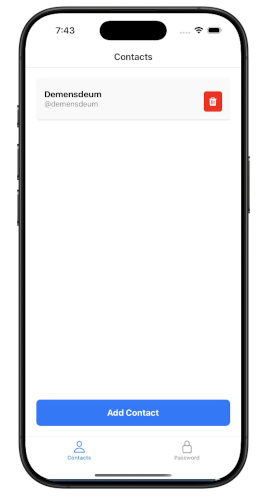
Also a quiz editor in the Teflecher Editor format based on Ionic + Capacitor technologies
Web:
https://demensdeum.com/software/teflecher-editor/

GitHub:
https://github.com/zefir1990/teflecher-editor

Pattern Interpreter in practice

In last article we looked at the theory of the Interpreter pattern, learned what an AST tree is and how to abstract terminal and non-terminal expressions. This time, let’s step away from the theory and see how this pattern is applied in serious commercial projects that we all use every day!

Spoiler: You may be using the Interpreter pattern right now, just by reading this text in your browser!

One of the most striking and, perhaps, the most important examples of the use of this pattern in the industry is JavaScript. The language, which was originally created “on the knee,” today works on billions of devices precisely thanks to the concept of interpretation.

10 days that changed the Internet

The history of JavaScript is full of legends. In 1995, Brendan Eich, while working at Netscape Communications, was given the task of creating a simple scripting language that could run directly in a browser (Netscape Navigator) to make web pages interactive. Management wanted something with a syntax similar to the then super popular Java, but intended not for professional engineers, but for web designers.

Eich had only 10 days to write the first prototype of the language, which was then called Mocha (then LiveScript, and only then JavaScript for marketing reasons). The rush was not accidental: Microsoft was hot on its heels, which at the same time was actively preparing its own scripting language VBScript for embedding in the Internet Explorer browser. Netscape urgently needed to release its response so as not to lose in the looming browser war.

There was simply no time to write a complex compiler into machine code. The obvious and fastest solution for Eich was the architecture of the classic Interpreter.

The first interpreter (SpiderMonkey) worked like this:

  1. It read the text source code of the script from the page.
  2. The lexical analyzer broke the text into tokens.
  3. The parser built an Abstract Syntax Tree (AST). In terms of the Interpreter pattern, this tree consisted of terminal expressions (strings, numbers like 42) and non-terminal (function calls, statements like If, ​​While).
  4. Then the virtual machine “traversed” this tree step by step, executing the instructions embedded in it at each node (calling a method similar to Interpret()).

Context and Objects

Remember the Context object that we had to pass to the Interpret(Context context) method in the classic implementation? The interpreter needs it to store the current memory state.

In the case of JavaScript, the role of this context at the top level is played by a Global object (for example, window in a browser). When your AST node tries to, say, write text to the screen via document.write(“Hello”), the interpreter accesses its context (the document object) and calls the desired internal browser API.

It is thanks to the interpreter that JavaScript is able to interact so easily with the DOM (Document Object Model) – these are all just objects in a context that are accessed by tree nodes.

Evolution of the interpreter: JIT Compilation

Historically, JS in browsers has long remained a “pure” interpreter. And this had a big disadvantage – slow speed. Parsing the tree and slowly traversing each node each time the script was executed slowed down complex web applications.

With the advent of Google’s V8 engine (built into Chrome) in 2008, a revolution occurred. Engineers realized that one interpreter is not enough for the modern web. The engine has become more complex: it still builds the AST tree, but now uses JIT (Just-In-Time) compilation.

Modern JS engines (V8, SpiderMonkey) work like a complex pipeline:

  1. The fast and dumb base interpreter starts executing your JS code instantly, without even waiting for it to compile (the classic pattern still works here).
  2. In parallel, the engine monitors “hot” sections of code (loops or functions that are called thousands of times).
  3. These sections are compiled by the JIT compiler directly into optimized machine code, bypassing the slow interpreter.

It was this combination of the instant start of the interpreter and the computing power of compilation that allowed JavaScript to take over the world, becoming the language of servers (Node.js) and mobile applications (React Native).

Interpreter in the gaming industry

Despite the dominance of C++ in heavy computing, the Interpreter pattern is an industry standard in game development for creating game logic. For what? So that game designers can make games without the risk of “dropping” the engine or the need to constantly recompile it.

An excellent historical example is UnrealScript – the language in which the logic of the Unreal Tournament and Gears of War games was written in Unreal Engine 1, 2 and 3. The text was compiled into compact abstract machine bytecode, which was then step by step (interpreted) by the engine’s virtual machine.

Visual graph scripts (Blueprints)

Today, text has been replaced by visual programming – the Blueprints system in Unreal Engine 4 and 5.

If you’ve ever opened a Blueprint in Unreal Engine, you’ve seen a lot of Nodes connected by wires. Architecturally, the entire Blueprints graph is a huge Abstract Syntax Tree (AST) drawn on the screen:

  1. Terminal Expressions: Constant nodes. For example, a node that simply stores the number 42 or a string. They return a specific value when interpreted.
  2. Non-Terminal Expressions: Compute nodes (Add) or flow control nodes (Branch). They have argument inputs, which the interpreter first evaluates recursively before producing the result as an output pin.

And the role of context here is played by the memory of an instance of a specific game object (Actor). The Interpreter Machine safely “walks” through this graph, requesting data and performing transitions.

Where else is the Interpreter used?

The interpreter pattern can be found in almost any complex system where dynamic instructions need to be executed. Here are just a few examples from commercial software:

  • Interpreted programming languages ​​(Python, Ruby, PHP). Their entire runtime is based on the classic pattern. For example, the CPython reference implementation first parses your .py script into an AST, compiles it into bytecode, and then a huge virtual machine (compute loop) interprets that bytecode step by step.
  • Java Virtual Machine (JVM). Initially, Java code is compiled not into machine instructions, but into bytecode. When you run the application, the JVM acts as an interpreter (albeit with aggressive JIT compilation, just like in V8).
  • Databases and SQL When you issue an SQL query (SELECT * FROM users) in PostgreSQL or MySQL, the database engine acts as an interpreter. It performs lexical analysis, builds an AST query tree, generates an execution plan, and then literally “interprets” this plan by iterating over the rows of the tables.
  • Regular expressions (RegEx). Any regular expression engine internally parses a string pattern (for example, ^\d{3}-\d{2}$) into a state graph (NFA/DFA Automata), which the internal interpreter then passes through, matching each input character with the vertices of this graph.
  • Unity Shader Graph / Unreal Material Editor – interpret visual nodes into modular shader code (GLSL/HLSL).
  • Blender Geometry Nodes – interpret mathematical and geometric operations to procedurally generate 3D models in real time.

Total

The Interpreter pattern has long gone beyond the scope of “writing your own calculator”. This is the most powerful industry standard. From JavaScript engines that execute gigabytes of code behind the scenes of browsers every day, to game designers that allow you to build complex logic without knowledge of C++, interpreters remain one of the most important architectural concepts in modern IT development.

Glazki TV: Modern player for Internet television

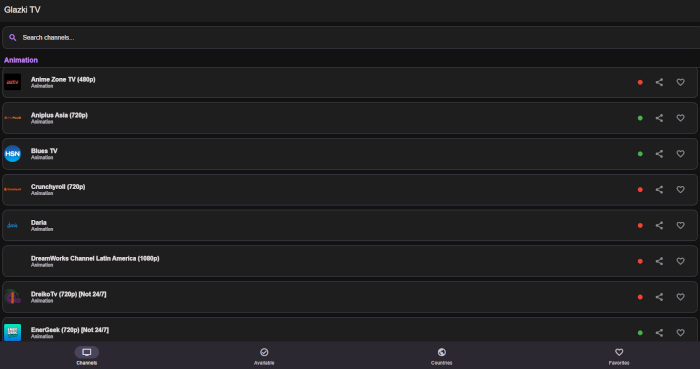
Glazki TV is a modern, high-performance player for Internet television (IPTV), built on the basis of React Native and Expo. The project is focused on ease of use and speed, providing a convenient interface for viewing IPTV channels both on mobile devices and in the browser.

Main features

  • 📺 Channel Browsing: Browse thousands of channels, categorized for easy navigation.
  • 🔍 Search: Quickly find the channels you need by name.
  • ❤️ Favorites: Save your favorite channels for quick access (data saved locally).
  • 🔗 Deep Linking: Share direct links to channels that open automatically.
  • 🌓 Theme support: The interface automatically adapts to the system dark or light theme.
  • 🌐 Web support: The player is fully functional in the browser with URL synchronization.

Technology stack

The project is based on modern development tools:

  • Framework: React Native + Expo
  • Video Player: expo-video (замена устаревшему expo-av)
  • UI Toolkit: react-native-paper
  • Playlist Parser: iptv-playlist-parser

Web version:
https://demensdeum.com/software/glazki-tv/

Google Play version:
https://play.google.com/store/apps/details?id=com.demensdeum.glazkitv

The project continues to develop, and I would welcome any feedback!

Flame Steel: Death Mask 2

In the dim, neon-flickering depths of the digital underworld, a new challenge awaits. We are excited to pull back the curtain on Flame Steel: Death Mask 2, a multiplayer 3D dungeon crawler that blends retro-cyberpunk aesthetics with modern real-time gameplay.

🕹️ What is Flame Steel: Death Mask 2?

Imagine waking up in a procedurally generated maze where every shadow could be another player or a hostile “Filter” entity. Flame Steel: Death Mask 2 puts you in the boots of a Seeker, navigating a world built on the Flame Steel Engine 2 and Three.js.

The game is currently in its early stages of development, but the core experience is already live and ready for exploration.

🚀 Key Features

  • Multiplayer Exploration: You aren’t alone in the grid. See other players in real-time as you navigate the labyrinthine corridors.
  • Procedural Dungeons: No two runs are the same. The server generates fresh maps filled with mystery and danger.
  • The Terminal: For those who prefer a more “hands-on” approach, an integrated command-line interface allows you to interact with the system directly—perform advanced actions, debug, or simply chat with fellow Seekers.
  • Combat & Survival: Face off against Filters to earn bits, then use those bits to unlock Chests and upgrade your stats. Keep an eye on your health; survival isn’t guaranteed.
  • Retro-Cyberpunk Aesthetic: High-contrast visuals and a gritty atmosphere that pays homage to the classic cyberpunk era.

🛠️ The Tech Behind the Mask

Built for the browser, the game leverages:

  • Frontend: Vanilla JavaScript and Three.js for smooth 3D rendering.
  • Backend: Node.js and WebSockets (ws) for lightning-fast multiplayer synchronization.
  • Infrastructure: MongoDB for data persistence and Redis for real-time spatial indexing.

🗺️ What’s Next?

We are just getting started. As an early-access project, Death Mask 2 will receive frequent updates, including:

  • New entity types and complex combat mechanics.
  • Deeper lore and environmental storytelling.
  • Enhanced terminal commands and social features.
  • Visual and performance polish.

🔗 Join the Grid

Want to test your mettle? Enter your codename and initialize your identity today:

👉 Play Flame Steel: Death Mask 2

Stay tuned for more updates as we continue to expand the digital frontier. Welcome to the service. It requires you.

Ushki Radio

Ushki-Radio is a cross-platform radio player for online radio, made with a focus on simplicity and listening pleasure. No unnecessary functions, no overloaded interfaces – just turn it on and listen.


https://demensdeum.com/software/ushki-radio

The project uses the open source Radio Browser, making thousands of radio stations from all over the world available in the application. You can search for them by name, genre or popularity, add them to your favorites and quickly return to your favorite stations.

Ushki-Radio is perfect for the role of a background radio player: it remembers the last station, allows you to control the volume and does not require complex settings. The interface is concise and understandable – everything is done so that nothing distracts from music, conversations and broadcasting.

Technically, the project is built on React Native and Expo, so it works both in the browser and as a native application. Under the hood, expo-av is used to play audio, and user settings are stored locally. There is support for several languages, including Russian and English.

Ushki-Radio is a good example of what a modern Internet radio player can be: open, lightweight, expandable and focused primarily on the listener. The project is distributed under the MIT license and is perfect for both personal use and as a basis for your own experiments with audio applications.

GitHub:
https://github.com/demensdeum/Ushki-Radio

coverer

Coverseer – intelligent process observer using LLM

Coverseer is a Python CLI tool for intelligently monitoring and automatically restarting processes. Unlike classic watchdog solutions, it analyzes the application’s text output using the LLM model and makes decisions based on context, not just the exit code.

The project is open source and available on GitHub:
https://github.com/demensdeum/coverseer

What is Coverser

Coverseer starts the specified process, continuously monitors its stdout and stderr, feeds the latest chunks of output to the local LLM (via Ollama), and determines whether the process is in the correct running state.

If the model detects an error, freeze, or incorrect behavior, Coverseer automatically terminates the process and starts it again.

Key features

  • Contextual analysis of output – instead of checking the exit code, log analysis is used using LLM
  • Automatic restart – the process is restarted when problems or abnormal termination are detected
  • Working with local models – Ollama is used, without transferring data to external services
  • Detailed logging – all actions and decisions are recorded for subsequent diagnostics
  • Standalone execution – can be packaged into a single executable file (for example, .exe)

How it works

  1. Coverseer runs the command passed through the CLI
  2. Collects and buffers text output from the process
  3. Sends the last rows to the LLM model
  4. Gets a semantic assessment of the process state
  5. If necessary, terminates and restarts the process

This approach allows you to identify problems that cannot be detected by standard monitoring tools.

Requirements

  • Python 3.12 or later
  • Ollama installed and running
  • Loaded model gemma3:4b-it-qat
  • Python dependencies: requests, ollama-call

Use example


python coverseer.py "your command here"

For example, watching the Ollama model load:


python coverseer.py "ollama pull gemma3:4b-it-qat"

Coverseer will analyze the command output and automatically respond to failures or errors.

Practical application

Coverseer is especially useful in scenarios where standard supervisor mechanisms are insufficient:

  • CI/CD pipelines and automatic builds
  • Background services and agents
  • Experimental or unstable processes
  • Tools with large amounts of text logs
  • Dev environments where self-healing is important

Why the LLM approach is more effective

Classic monitoring systems respond to symptoms. Coverser analyzes behavior. The LLM model is able to recognize errors, warnings, repeated failures and logical dead ends even in cases where the process formally continues to operate.

This makes monitoring more accurate and reduces the number of false alarms.

Conclusion

Coverseer is a clear example of the practical application of LLM in DevOps and automation tasks. It expands on the traditional understanding of process monitoring and offers a more intelligent, context-based approach.

The project will be of particular interest to developers who are experimenting with AI tools and looking for ways to improve the stability of their systems without complicating the infrastructure.

Flame Steel: Mars Miners

Flame Steel: Mars Miners is a tactical strategy game with unusual pacing and an emphasis on decision making rather than reflexes. The game takes place on Mars, where players compete for control of resources and territories in the face of limited information and constant pressure from rivals.

The gameplay is based on the construction of hub stations that form the infrastructure of your expedition. Nodes allow you to extract resources, expand your zone of influence, and build logistics. Every placement matters: one mistake can open the enemy’s path to key sectors or deprive you of a strategic advantage.

The rhythm of the game is deliberately controlled and intense. It is somewhere between chess, Go and naval combat: positioning, predicting the opponent’s actions and the ability to work with uncertainty are important here. Part of the map and the enemy’s intentions remain hidden, so success depends not only on calculation, but also on reading the situation.

Flame Steel: Mars Miners supports online play, which makes each game unique – strategies evolve, and the meta is being formed right now. The game is at an early stage of development, and this is its strength: players have the opportunity to be the first to dive into a new, non-standard project, influence its development and discover mechanics that do not copy the usual templates of the genre.

If you’re interested in tactical games with depth, experimental design, and an emphasis on thinking, Flame Steel: Mars Miners is worth checking out now.

GAME RULES

* The playing field consists of cells on which players place their objects one by one. Each turn a player can perform one construction action.

* Only two types of objects are allowed to be built: hub stations and mines. Any construction is possible exclusively on one free cell located next to an existing player node vertically or horizontally. Diagonal placement is not allowed.

* Hub stations form the basis of territory control and serve as expansion points. Mines are placed according to the same rules, but are counted as resource objects and directly affect the final result of the party.

* If a player builds a continuous line of his node stations vertically or horizontally, such a line automatically turns into a weapon. The weapon makes it possible to attack the enemy and destroy his infrastructure.

* To fire a gun, the player selects one cell belonging to his gun and points to any enemy node station on the field. The selected enemy node station is destroyed and removed from the playing field. Mines cannot be attacked directly – only through the destruction of nodes that provide access to them.

* The game continues until the set end of the game. The winner is the player who at this moment has the largest number of resource mines on the playing field. In case of equality, the decisive factor may be territory control or additional conditions determined by the game mode.

https://mediumdemens.vps.webdock.cloud/mars-miners

Antigravity

In a couple of days, with the help of Antigravity, I transferred the Masonry-AR backend from PHP + MySQL to Node.js + MongoDB + Redis -> Docker. The capabilities of AI are truly amazing, I remember how in 2022 I wrote the simplest shaders on shadertoy.com via ChatGPT and it seemed that this toy couldn’t do anything higher.
https://www.shadertoy.com/view/cs2SWm

Four years later, I watch how, in ~10 prompts, I effortlessly transferred my project from one back platform to another, adding containerization.
https://mediumdemens.vps.webdock.cloud/masonry-ar/

Cool, really cool.

Kaban Board

KabanBoard is an open-source web application for managing tasks in Kanban format. The project is focused on simplicity, understandable architecture and the possibility of modification for the specific tasks of a team or an individual developer.

The solution is suitable for small projects, internal team processes, or as the basis for your own product without being tied to third-party SaaS services.

The project repository is available on GitHub:
https://github.com/demensdeum/KabanBoard

Main features

KabanBoard implements a basic and practical set of functions for working with Kanban boards.

  • Creating multiple boards for different projects
  • Column structure with task statuses
  • Task cards with the ability to edit and delete
  • Moving tasks between columns (drag & drop)
  • Color coding of cards
  • Dark interface theme

The functionality is not overloaded and is focused on everyday work with tasks.

Technologies used

The project is built on a common and understandable stack.

  • Frontend:Vue 3, Vite
  • Backend: Node.js, Express
  • Data storage: MongoDB

The client and server parts are separated, which simplifies the support and further development of the project.

Project deployment

To run locally, you will need a standard environment.

  • Node.js
  • MongoDB (locally or via cloud)

The project can be launched either in normal mode via npm or using Docker, which is convenient for quick deployment in a test or internal environment.

Practical application

KabanBoard can be used in different scenarios.

  • Internal task management tool
  • Basis for a custom Kanban solution
  • Training project for studying SPA architecture
  • Starting point for a pet project or portfolio

Conclusion

KabanBoard is a neat and practical solution for working with Kanban boards. The project does not pretend to replace large corporate systems, but is well suited for small teams, individual use and further development for specific tasks.

Gofis

Gofis is a lightweight command line tool for quickly searching files in the file system.
It is written in Go and makes heavy use of parallelism (goroutines), which makes it especially efficient
when working with large directories and projects.

The project is available on GitHub:
https://github.com/demensdeum/gofis

🧠 What is Gofis

Gofis is a CLI utility for searching files by name, extension or regular expression.
Unlike classic tools like find, gofis was originally designed
with an emphasis on speed, readable output, and parallel directory processing.

The project is distributed under the MIT license and can be freely used
for personal and commercial purposes.

⚙️ Key features

  • Parallel directory traversal using goroutines
  • Search by file name and regular expressions
  • Filtering by extensions
  • Ignoring heavy directories (.git, node_modules, vendor)
  • Human-readable output of file sizes
  • Minimal dependencies and fast build

🚀 Installation

Requires Go installed to work.

git clone https://github.com/demensdeum/gofis
cd gofis
go build -o gofis main.go

Once built, the binary can be used directly.

There is also a standalone version for modern versions of Windows on the releases page:
https://github.com/demensdeum/gofis/releases/

🔍 Examples of use

Search files by name:

./gofis -n "config" -e ".yaml" -p ./src

Quick positional search:

./gofis "main" "./projects" 50

Search using regular expression:

./gofis "^.*\.ini$" "/"

🧩 How it works

Gofis is based on Go’s competitive model:

  • Each directory is processed in a separate goroutine
  • Uses a semaphore to limit the number of active tasks
  • Channels are used to transmit search results

This approach allows efficient use of CPU resources
and significantly speeds up searching on large file trees.

👨‍💻 Who is Gofis suitable for?

  • Developers working with large repositories
  • DevOps and system administrators
  • Users who need a quick search from the terminal
  • For those learning the practical uses of concurrency in Go

📌 Conclusion

Gofis is a simple but effective tool that does one thing and does it well.
If you often search for files in large projects and value speed,
this CLI tool is definitely worth a look.

ollama-call

If you use Ollama and don’t want to write your own API wrapper every time,
the ollama_call project significantly simplifies the work.

This is a small Python library that allows you to send a request to a local LLM with one function
and immediately receive a response, including in JSON format.

Installation

pip install ollama-call

Why is it needed

  • minimal code for working with the model;
  • structured JSON response for further processing;
  • convenient for rapid prototypes and MVPs;
  • supports streaming output if necessary.

Use example

from ollama_call import ollama_call

response = ollama_call(
    user_prompt="Hello, how are you?",
    format="json",
    model="gemma3:12b"
)

print(response)

When it is especially useful

  • you write scripts or services on top of Ollama;
  • need a predictable response format;
  • there is no desire to connect heavy frameworks.

Total

ollama_call is a lightweight and clear wrapper for working with Ollama from Python.
A good choice if simplicity and quick results are important.

GitHub
https://github.com/demensdeum/ollama_call

SFAP: a modular framework for modern data acquisition and processing

In the context of the active development of automation and artificial intelligence, the task of effectively collecting,
Cleaning and transforming data becomes critical. Most solutions only close
separate stages of this process, requiring complex integration and support.

SFAP (Seek · Filter · Adapt · Publish) is an open-source project in Python,
which offers a holistic and extensible approach to processing data at all stages of its lifecycle:
from searching for sources to publishing the finished result.

What is SFAP

SFAP is an asynchronous framework built around a clear concept of a data processing pipeline.
Each stage is logically separate and can be independently expanded or replaced.

The project is based on the Chain of Responsibility architectural pattern, which provides:

  • pipeline configuration flexibility;
  • simple testing of individual stages;
  • scalability for high loads;
  • clean separation of responsibilities between components.

Main stages of the pipeline

Seek – data search

At this stage, data sources are discovered: web pages, APIs, file storages
or other information flows. SFAP makes it easy to connect new sources without changing
the rest of the system.

Filter – filtering

Filtering is designed to remove noise: irrelevant content, duplicates, technical elements
and low quality data. This is critical for subsequent processing steps.

Adapt – adaptation and processing

The adaptation stage is responsible for data transformation: normalization, structuring,
semantic processing and integration with AI models (including generative ones).

Publish – publication

At the final stage, the data is published in the target format: databases, APIs, files, external services
or content platforms. SFAP does not limit how the result is delivered.

Key features of the project

  • Asynchronous architecture based on asyncio
  • Modularity and extensibility
  • Support for complex processing pipelines
  • Ready for integration with AI/LLM solutions
  • Suitable for highly loaded systems

Practical use cases

  • Aggregation and analysis of news sources
  • Preparing datasets for machine learning
  • Automated content pipeline
  • Cleansing and normalizing large data streams
  • Integration of data from heterogeneous sources

Getting started with SFAP

All you need to get started is:

  1. Clone the project repository;
  2. Install Python dependencies;
  3. Define your own pipeline steps;
  4. Start an asynchronous data processing process.

The project is easily adapted to specific business tasks and can grow with the system,
without turning into a monolith.

Conclusion

SFAP is not just a parser or data collector, but a full-fledged framework for building
modern data-pipeline systems. It is suitable for developers and teams who care about
scalable, architecturally clean, and data-ready.
The project source code is available on GitHub:
https://github.com/demensdeum/SFAP

FlutDataStream

A Flutter app that converts any file into a sequence of machine-readable codes (QR and DataMatrix) for high-speed data streaming between devices.

Peculiarities
* Dual Encoding: Represents each data block as both a QR code and a DataMatrix code.
*High-speed streaming: Supports automatic switching interval up to 330ms.
* Smart Chunking: Automatically splits files into custom chunks (default: 512 bytes).
* Detailed Scanner: Read ASCII code in real time for debugging and instant feedback.
* Automatic recovery: Instantly recovers and saves files to your downloads directory.
* System Integration: Automatically opens the saved file using the default system application after completion.

https://github.com/demensdeum/FlutDataStream

Why can’t I fix the bug?

You spend hours working on the code, going through hypotheses, adjusting the conditions, but the bug is still reproduced. Sound familiar? This state of frustration is often called “ghost hunting.” The program seems to live its own life, ignoring your corrections.

One of the most common – and most annoying – reasons for this situation is looking for an error in completely the wrong place in the application.

The trap of “false symptoms”

When we see an error, our attention is drawn to the place where it “shot”. But in complex systems, where a bug occurs (crash or incorrect value) is only the end of a long chain of events. When you try to fix the ending, you are fighting the symptoms, not the disease.

This is where the flowchart concept comes in.

How it works in reality

Of course, it is not necessary to directly draw (draw) a flowchart on paper every time, but it is important to have it in your head or at hand as an architectural guide. A flowchart allows you to visualize the operation of an application as a tree of outcomes.

Without understanding this structure, the developer is often groping in the dark. Imagine the situation: you edit the logic in one condition branch, while the application (due to a certain set of parameters) goes to a completely different branch that you didn’t even think about.

Result: You spend hours on a “perfect” code fix in one part of the algorithm, which, of course, does nothing to fix the problem in another part of the algorithm where it actually fails.


Algorithm for defeating a bug

To stop beating on a closed door, you need to change your approach to diagnosis:

  • Find the state in the outcome tree:Before writing code, you need to determine exactly the path that the application has taken. At what point did logic take a wrong turn? What specific state (State) led to the problem?
  • Reproduction is 80% of success: This is usually done by testers and automated tests. If the bug is “floating”, development is involved in the process to jointly search for conditions.
  • Use as much information as possible: Logs, OS version, device parameters, connection type (Wi-Fi/5G) and even a specific telecom operator are important for localization.

“Photograph” of the moment of error

Ideally, to fix it, you need to get the full state of the application at the time the bug was reproduced. Interaction logs are also critically important: they show not only the final point, but also the entire user path (what actions preceded the failure). This helps to understand how to recreate a similar state again.

Future tip: If you encounter a complex case, add extended debug logging information to this section of code in case the situation happens again.


The problem of “elusive” states in the era of AI

In modern systems using LLM (Large Language Models), classical determinism (“one input, one output”) is often violated. You can pass exactly the same input data, but get a different result.

This happens due to the non-determinism of modern production systems:

  • GPU Parallelism: GPU floating point operations are not always associative. Due to parallel execution of threads, the order in which numbers are added may change slightly, which may affect the result.
  • GPU temperature and throttling: Execution speed and load distribution may depend on the physical state of the hardware. In huge models, these microscopic differences accumulate and can lead to the selection of a different token at the output.
  • Dynamic batching: In the cloud, your request is combined with others. Different batch sizes change the mathematics of calculations in the kernels.

Under such conditions, it becomes almost impossible to reproduce “that same state”. Only a statistical approach to testing can save you here.


When logic fails: Memory problems

If you are working with “unsafe” languages ​​(C or C++), the bug may occur due to Memory Corruption.

These are the most severe cases: an error in one module can “overwrite” data in another. This leads to completely inexplicable and isolated failures that cannot be traced using normal application logic.

How to protect yourself at the architectural level?

To avoid such “mystical” bugs, you should use modern approaches:

  • Multithreaded programming patterns:Clear synchronization eliminates race conditions.
  • Thread-safe languages: Tools that guarantee memory safety at compile time:
    • Rust: Ownership system eliminates memory errors.
    • Swift 6 Concurrency:Strong data isolation checks.
    • Erlang: Complete process isolation through the actor model.

Summary

Fixing a bug is not about writing new code, but about understanding how the old one works. Remember: you could be wasting time editing a branch that management doesn’t even touch. Record the state of the system, take into account the factor of AI non-determinism and choose safe tools.

Ferral

Ferral is a high-level, multi-paradigm programming language specifically designed for generating code from large language models (LLMs). While traditional languages ​​were designed with human ergonomics in mind, Ferral is optimized for how large language models (LLMs) reason, tokenize, and infer logic.

The name is spelled with two R’s, indicating a “reimagined” approach to the unpredictable nature of AI-generated code.

https://github.com/demensdeum/ferral

DemensDeum Coding Challenge #2

I’m starting Demensdeum Coding Challenge #2:
1. You need to vibecode the web application to display a list of parties/events in the user’s area.
2. The data source can be web scraping from the front, or a local/remote database.
3. Show events/parties on the map only for today.
4. You can change the search radius.
5. Submit as a sequence of text prompts that can be reproduced in free code generators, such as Google AI Studio.
6. Should work on the web for iOS, Android, PC
7. Best design wins
8. Display detailed information about the event by tapping on the event on the map.
9. Zoom maps with your fingers or mouse.
10. The winner is chosen by the jury (write to me to participate in the jury)
11. Prize 200 USDT
12. Due date: July 1.

Winner of the past DemensDeum Coding Challenge #1
https://demensdeum.com/blog/ru/2025/06/03/demensdeum-code-challenge-1-winner/

Masonry-AR Update

The ability to buy coins for cryptocurrency has been added to the Masonry-AR game! For $1 you can get 5000 MOS. Referral links have also been added to the game; for every friend’s purchase, the referrer receives 50,000 MOS. Details in the Masonic Wiki. A self-walking mode has also been added: when there is no access to the GPS module, the Mason begins to walk from one of the capitals of the world automatically, only forward.

Game link:
https://demensdeum.com/demos/masonry-ar/client/

Donkey Adept

“Donkey Adept” is a stunning, electrifying piece of pixelated surrealism. In the center is a figure in a black leather jacket, whose head is a flaming, static-ridden television with fiery donkey ears. The subject holds a powerful lantern, acting as a lone sentinel who seeks the truth amidst the noise. It’s a furious retro-style meditation on media, madness and the relentless search for light.

https://opensea.io/item/ethereum/0x008d50b3b9af49154d6387ac748855a3c62bf40d/5

Cube Art Project 2 Online

Meet the Cube Art Project 2 Online – light, fast, and fully rewritten editor of the station schedule, which works directly in the browser. Now with the possibility of joint creativity!

This is not just a tool, but an experiment with color, geometry and a meditative 3D creation to which you can connect friends. The project was created on pure JavaScript and Three.js without frameworks and Webassembly, demonstrating the capabilities of Webgl and Shaaders.

New: Multiplayer! Cooperate with other users in real time. All changes, the addition and coloring of cubes are synchronized instantly, allowing you to create station masterpieces together.

Control:
– WASD – moving the camera
– Mouse – rotation
– Gui – color settings

Online:
https://demensdeum.com/software/cube-art-project-2-online/

Sources on Github:
https://github.com/demensdeum/cube-art-project-2-online

The project is written on pure JavaScript using Three.js.
Without frameworks, without collectors, without Webassembly – only Webgl, shaders and a little love for pixel geometry.