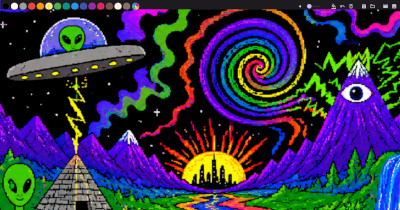
Aleka is a lightweight, fast drawing app written in Flutter. It works everywhere: in the browser, on the desktop (Windows, macOS, Linux) and on mobile devices (iOS, Android).
Under the hood is pure Dart, Material 3 and attention to detail.
Opportunities
- Freehand drawing: smooth strokes with quadratic Bezier interpolation.
- Palette of 15 colors: quick selection with visual indication.
- Brush size: adjustable with a slider from 1 to 30 px.
- Undo: step back through your strokes.
- Clear the canvas: with one click.
- Flood Fill: BFS with tolerance for smooth edges.
- Saving: format
.aleka(JSON). - Loading: open previously saved drawings and continue.
- PNG export: Capture canvas at 3x resolution.
- 🎬 Animation mode: Frame-by-frame animation with timeline:
- Adding and removing frames, each with its own design.
- Frame duration from 50 ms to 5 s.
- Change FPS: 6, 8, 12, 15, 24, 30 or 60.
- Export to MP4 (via ffmpeg on desktop, ffmpeg.wasm in browser).
- Dark and light theme: Material 3, follows the system.
Why Flutter?
Flutter allows you to write one application for six platforms without duplicating code. Aleka uses only the native capabilities of Dart and Flutter SDK and a minimum of third-party dependencies: file_picker, image for working with pixels when filling, ffmpeg_wasm for exporting video in the browser.
Architecture
The project adheres to the principles of clean architecture and SOLID:
- PaintCanvasController – controls the state of strokes and fills through the Listener/Observer pattern.
- PaintToolbar – UI component of the palette, slider and buttons.
- AlekaFile – serialization/deserialization in JSON, PNG capture.
- MovieController – model of frames and animation state.
- VideoExport – encapsulates MP4 encoding logic (desktop/web).
I/O functions (saveStrokes, loadStrokes, capturePng, etc.) are made injectable – they can be replaced with mocks during testing. The project has 79 tests: checking serialization, cancellation, loading/saving, PNG and video export, frame model and timeline.
File format .aleka
The .aleka file is readable JSON that can be opened in any text editor:
  "aleka": "1.0",
  "strokes": [
    {
      "color": 4278190080,
      "strokeWidth": 3.0,
      "points": [[100.0, 200.0], [150.0, 250.0]]
    }
  ]
}
Each stroke stores a color (ARGB32), a thickness, and an array of points. The format is versioned by the aleka field.
Animation mode
One of the key features is the built-in frame-by-frame animation editor. You draw a frame, add a new one, draw the next one, and so on. The timeline shows thumbnails and allows you to change the order and duration of frames. The finished animation can be exported to MP4.
The export algorithm iterates through all frames, captures them via RepaintBoundary, collects PNG bytes and transfers them to the encoder. On the desktop, the system ffmpeg is called, in the browser, ffmpeg.wasm is used – a full-fledged port of ffmpeg to WebAssembly, working directly in the browser sandbox.
Flood Fill
The fill implementation uses Breadth First Search (BFS) with a color tolerance (_kFillTolerance = 1000). This allows you to correctly handle smooth edges of strokes – the fill does not flow beyond the outline, but captures translucent pixels on the border. For an empty canvas, a solid fill is created without unnecessary calculations.
Try
Aleka is available on the web and as a native application:
demensdeum.com/software/aleka/
The source code is open under the MIT license:
Leave a Reply