关于我如何为 3D 编辑器 Cube Art Project 编写服务器部分的简要说明,服务器应该保存并显示 Web 版本用户的工作,使用保存按钮为他们提供短 URL。起初我想使用 Swift/PHP/Ruby/JS 或一些类似的现代语言作为后端,但在考虑了我的 VPS 的特点后,我决定用 C/C++ 来编写服务器。
首先,您需要在服务器上安装 libfcgi 以及 Web 服务器的 fcgi 支持模块,例如 Ubuntu 和 Apache:
sudo apt install libfcgi libapache2-mod-fcgid
接下来我们在config中配置模块: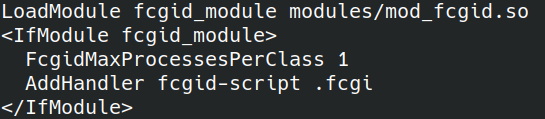
FcgidMaxProcessesPerClass –每个类的最大进程数,我将其设置为 1 个进程,因为我不希望有很大的负载。
AddHandler fcgid-script .fcgi – fcgi 模块应启动的文件扩展名。
将启动 cgi 应用程序的文件夹添加到配置中:
接下来,我们用 C/C++ 编写一个支持 fcgi 的应用程序,对其进行汇编,并将其复制到 /var/www/html/cgi-bin 文件夹中。
代码和构建脚本示例:
https://gitlab.com/demensdeum/cube-art-project-server/-/blob/master/src/cubeArtProjectServer.cpp
https://gitlab.com/demensdeum/cube-art-project-server/-/blob/master/src/build.sh
此后您需要重新启动您的网络服务器:
systemctl restart apache2
接下来,输入必要的权限以通过 chmod 执行 cgi-bin 文件夹。
之后,您的 cgi 程序应该使用链接通过浏览器运行,例如 Cube Art Project 服务器:
http://192.243.103.70/cgi-bin/cubeArtProject/cubeArtProjectServer.fcgi
如果出现问题,请查看 Web 服务器日志,或使用调试器连接到正在运行的进程;调试过程不应与调试常规客户端应用程序的过程有所不同。
来源
https://habr.com/ru/post/154187/
http://chriswu.me/blog/writing-hello-world-in-fcgi-with-c-plus-plus/
源代码
https://gitlab.com/demensdeum/cube-art -项目服务器
