It is possible to run macOS in Docker, despite the objections of people who say that this is impossible, and supposedly macOS has some kind of protection systems that can resist this.
Some of the classic ways to run macOS on PC machines have historically been:
*Hackintosh
* Virtualization, for example using VMWare
Hackintosh assumes the presence of hardware similar or very close to the original Mac. Virtualization imposes certain requirements on hardware, but generally not as strict as in the case of Hackintosh. However, in the case of virtualization, there are performance problems, since macOS is not optimized for working in a virtual environment.
Recently, it has become possible to run macOS in Docker. This is made possible by the Docker-OSX project, which provides ready-made macOS images to run on Docker. It is worth noting that Docker-OSX is not an official Apple project and is not supported by it. However, it allows you to run macOS on Docker and use it to develop and test applications.
One of the first projects to run macOS in Docker:
https://github.com/sickcodes/Docker-OSX
However, I was never able to launch it fully; after loading into Recovery OS, my keyboard and mouse simply fell off, and I could not continue the installation. At the same time, in the first boot menu, the keyboard works. Perhaps the fact is that this project is no longer so actively supported, and there are some specific problems when running on Windows 11 + WSL2 + Ubuntu.
One of the most active projects at the moment:
https://github.com/dockur/macos
Allows you to run macOS in Docker, the interface works through the browser via VNC(?) forwarding. After startup, macOS is available at http://localhost:5900
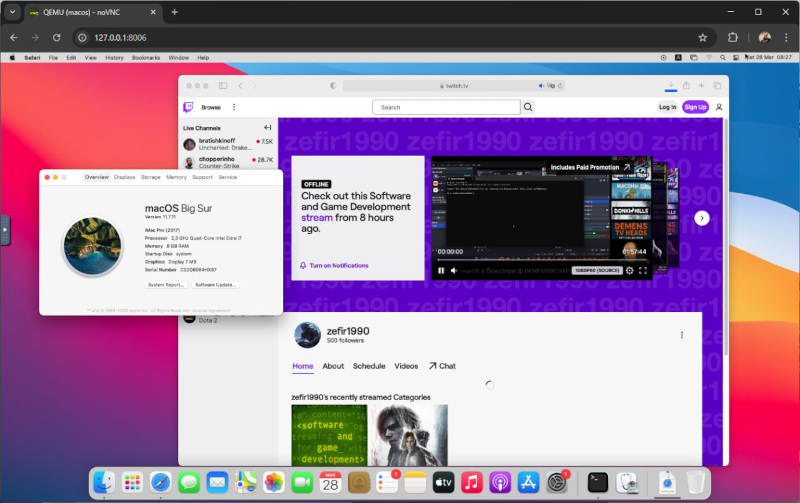
I managed to run this project and install macOS Big Sur (minute 2020) on Windows 11 + WSL2 + Ubuntu, but only by changing the compose file, namely:
environment:
    VERSION: "11"
    RAM_SIZE: "8G"
    CPU_CORES: "4"
VERSION: “11” is the version of macOS, in this case Big Sur
RAM_SIZE: “8G” is the amount of RAM allocated for macOS
CPU_CORES: “4” is the number of CPU cores allocated to macOS
At the moment, running macOS tahoe (16) is also possible, but there are a number of problems that the project developers are trying to solve valiantly.
This original way of launching macOS allows you to try it on your non-Mac hardware and, having suffered enough, go and buy yourself a Mac. However, it can be useful for testing software on older systems and general development.
