Ushki Radio

Ushki-Radio is a cross-platform radio player for online radio, made with a focus on simplicity and listening pleasure. No unnecessary functions, no overloaded interfaces – just turn it on and listen.


https://demensdeum.com/software/ushki-radio

The project uses the open source Radio Browser, making thousands of radio stations from all over the world available in the application. You can search for them by name, genre or popularity, add them to your favorites and quickly return to your favorite stations.

Ushki-Radio is perfect for the role of a background radio player: it remembers the last station, allows you to control the volume and does not require complex settings. The interface is concise and understandable – everything is done so that nothing distracts from music, conversations and broadcasting.

Technically, the project is built on React Native and Expo, so it works both in the browser and as a native application. Under the hood, expo-av is used to play audio, and user settings are stored locally. There is support for several languages, including Russian and English.

Ushki-Radio is a good example of what a modern Internet radio player can be: open, lightweight, expandable and focused primarily on the listener. The project is distributed under the MIT license and is perfect for both personal use and as a basis for your own experiments with audio applications.

GitHub:
https://github.com/demensdeum/Ushki-Radio

coverer

Coverseer – intelligent process observer using LLM

Coverseer is a Python CLI tool for intelligently monitoring and automatically restarting processes. Unlike classic watchdog solutions, it analyzes the application’s text output using the LLM model and makes decisions based on context, not just the exit code.

The project is open source and available on GitHub:
https://github.com/demensdeum/coverseer

What is Coverser

Coverseer starts the specified process, continuously monitors its stdout and stderr, feeds the latest chunks of output to the local LLM (via Ollama), and determines whether the process is in the correct running state.

If the model detects an error, freeze, or incorrect behavior, Coverseer automatically terminates the process and starts it again.

Key features

  • Contextual analysis of output – instead of checking the exit code, log analysis is used using LLM
  • Automatic restart – the process is restarted when problems or abnormal termination are detected
  • Working with local models – Ollama is used, without transferring data to external services
  • Detailed logging – all actions and decisions are recorded for subsequent diagnostics
  • Standalone execution – can be packaged into a single executable file (for example, .exe)

How it works

  1. Coverseer runs the command passed through the CLI
  2. Collects and buffers text output from the process
  3. Sends the last rows to the LLM model
  4. Gets a semantic assessment of the process state
  5. If necessary, terminates and restarts the process

This approach allows you to identify problems that cannot be detected by standard monitoring tools.

Requirements

  • Python 3.12 or later
  • Ollama installed and running
  • Loaded model gemma3:4b-it-qat
  • Python dependencies: requests, ollama-call

Use example


python coverseer.py "your command here"

For example, watching the Ollama model load:


python coverseer.py "ollama pull gemma3:4b-it-qat"

Coverseer will analyze the command output and automatically respond to failures or errors.

Practical application

Coverseer is especially useful in scenarios where standard supervisor mechanisms are insufficient:

  • CI/CD pipelines and automatic builds
  • Background services and agents
  • Experimental or unstable processes
  • Tools with large amounts of text logs
  • Dev environments where self-healing is important

Why the LLM approach is more effective

Classic monitoring systems respond to symptoms. Coverser analyzes behavior. The LLM model is able to recognize errors, warnings, repeated failures and logical dead ends even in cases where the process formally continues to operate.

This makes monitoring more accurate and reduces the number of false alarms.

Conclusion

Coverseer is a clear example of the practical application of LLM in DevOps and automation tasks. It expands on the traditional understanding of process monitoring and offers a more intelligent, context-based approach.

The project will be of particular interest to developers who are experimenting with AI tools and looking for ways to improve the stability of their systems without complicating the infrastructure.

Kaban Board

KabanBoard is an open-source web application for managing tasks in Kanban format. The project is focused on simplicity, understandable architecture and the possibility of modification for the specific tasks of a team or an individual developer.

The solution is suitable for small projects, internal team processes, or as the basis for your own product without being tied to third-party SaaS services.

The project repository is available on GitHub:
https://github.com/demensdeum/KabanBoard

Main features

KabanBoard implements a basic and practical set of functions for working with Kanban boards.

  • Creating multiple boards for different projects
  • Column structure with task statuses
  • Task cards with the ability to edit and delete
  • Moving tasks between columns (drag & drop)
  • Color coding of cards
  • Dark interface theme

The functionality is not overloaded and is focused on everyday work with tasks.

Technologies used

The project is built on a common and understandable stack.

  • Frontend:Vue 3, Vite
  • Backend: Node.js, Express
  • Data storage: MongoDB

The client and server parts are separated, which simplifies the support and further development of the project.

Project deployment

To run locally, you will need a standard environment.

  • Node.js
  • MongoDB (locally or via cloud)

The project can be launched either in normal mode via npm or using Docker, which is convenient for quick deployment in a test or internal environment.

Practical application

KabanBoard can be used in different scenarios.

  • Internal task management tool
  • Basis for a custom Kanban solution
  • Training project for studying SPA architecture
  • Starting point for a pet project or portfolio

Conclusion

KabanBoard is a neat and practical solution for working with Kanban boards. The project does not pretend to replace large corporate systems, but is well suited for small teams, individual use and further development for specific tasks.

Gofis

Gofis is a lightweight command line tool for quickly searching files in the file system.
It is written in Go and makes heavy use of parallelism (goroutines), which makes it especially efficient
when working with large directories and projects.

The project is available on GitHub:
https://github.com/demensdeum/gofis

🧠 What is Gofis

Gofis is a CLI utility for searching files by name, extension or regular expression.
Unlike classic tools like find, gofis was originally designed
with an emphasis on speed, readable output, and parallel directory processing.

The project is distributed under the MIT license and can be freely used
for personal and commercial purposes.

⚙️ Key features

  • Parallel directory traversal using goroutines
  • Search by file name and regular expressions
  • Filtering by extensions
  • Ignoring heavy directories (.git, node_modules, vendor)
  • Human-readable output of file sizes
  • Minimal dependencies and fast build

🚀 Installation

Requires Go installed to work.

git clone https://github.com/demensdeum/gofis
cd gofis
go build -o gofis main.go

Once built, the binary can be used directly.

There is also a standalone version for modern versions of Windows on the releases page:
https://github.com/demensdeum/gofis/releases/

🔍 Examples of use

Search files by name:

./gofis -n "config" -e ".yaml" -p ./src

Quick positional search:

./gofis "main" "./projects" 50

Search using regular expression:

./gofis "^.*\.ini$" "/"

🧩 How it works

Gofis is based on Go’s competitive model:

  • Each directory is processed in a separate goroutine
  • Uses a semaphore to limit the number of active tasks
  • Channels are used to transmit search results

This approach allows efficient use of CPU resources
and significantly speeds up searching on large file trees.

👨‍💻 Who is Gofis suitable for?

  • Developers working with large repositories
  • DevOps and system administrators
  • Users who need a quick search from the terminal
  • For those learning the practical uses of concurrency in Go

📌 Conclusion

Gofis is a simple but effective tool that does one thing and does it well.
If you often search for files in large projects and value speed,
this CLI tool is definitely worth a look.

FlutDataStream

A Flutter app that converts any file into a sequence of machine-readable codes (QR and DataMatrix) for high-speed data streaming between devices.

Peculiarities
* Dual Encoding: Represents each data block as both a QR code and a DataMatrix code.
*High-speed streaming: Supports automatic switching interval up to 330ms.
* Smart Chunking: Automatically splits files into custom chunks (default: 512 bytes).
* Detailed Scanner: Read ASCII code in real time for debugging and instant feedback.
* Automatic recovery: Instantly recovers and saves files to your downloads directory.
* System Integration: Automatically opens the saved file using the default system application after completion.

https://github.com/demensdeum/FlutDataStream

Ferral

Ferral is a high-level, multi-paradigm programming language specifically designed for generating code from large language models (LLMs). While traditional languages ​​were designed with human ergonomics in mind, Ferral is optimized for how large language models (LLMs) reason, tokenize, and infer logic.

The name is spelled with two R’s, indicating a “reimagined” approach to the unpredictable nature of AI-generated code.

https://github.com/demensdeum/ferral

Cube Art Project 2 Online

Meet the Cube Art Project 2 Online – light, fast, and fully rewritten editor of the station schedule, which works directly in the browser. Now with the possibility of joint creativity!

This is not just a tool, but an experiment with color, geometry and a meditative 3D creation to which you can connect friends. The project was created on pure JavaScript and Three.js without frameworks and Webassembly, demonstrating the capabilities of Webgl and Shaaders.

New: Multiplayer! Cooperate with other users in real time. All changes, the addition and coloring of cubes are synchronized instantly, allowing you to create station masterpieces together.

Control:
– WASD – moving the camera
– Mouse – rotation
– Gui – color settings

Online:
https://demensdeum.com/software/cube-art-project-2-online/

Sources on Github:
https://github.com/demensdeum/cube-art-project-2-online

The project is written on pure JavaScript using Three.js.
Without frameworks, without collectors, without Webassembly – only Webgl, shaders and a little love for pixel geometry.

Gingerita Prototype Windows

I present to your attention fork Kate text editor called Gingerita. Why Fork, why, what is the goal? I want to add the functionality that I need in my work, so as not to wait for the correction, adding features from the Kate team, or the adoption of my corrections to the Main branch.
At the moment, a prototype version for Windows is currently available, almost vanilla version of Kate with minimal changes. For Gingerita, I have developed two plugs – an image of the images directly from the editor and the built -in browser, for debugging my web projects or for interacting with AI with assistants such as ChatGPT.

The version for Windows can be tested by the link below:
https://github.com/demensdeum/Gingerita/releases/tag/prototype

Cube Art Project 2

Meet – Cube Art Project 2

The second version of the station editor, fully rewritten on pure JavaScript without Webassembly.
Light, fast and starts right in the browser – nothing more.

This is an experiment: cubes, color, freedom and a little meditative 3D geometry.
You can change colors using RGB-sloders, save and load scenes, move around space and just play.

Control:
– WASD – moving the camera
– Mouse – rotation
– Gui – color settings

Online:
https://demensdeum.com/software/cube-art-project-2/

Sources on Github:
https://github.com/demensdeum/cube-art-project-2

The project is written on pure JavaScript using Three.js.
Without frameworks, without collectors, without Webassembly – only Webgl, shaders and a little love for pixel geometry.

The scenes can be saved and loaded – create your worlds, save as JSON, share or return later to refinement.

Ghost Contacts

In the GhostContacts app, you can add contacts to the secret list, there is support for dark and bright topics, localization, export and imports of CSV contacts, an emergency password is supported to reset the list of contacts if the user suddenly requires a regular password for entering.

Application online:
https://demensdeum.com/software/ghost-contacts/

Github:
https://github.com/demensdeum/GhostContacts

Automatic code analysis with Bistr

If you need to analyze the source code of a project, but want to automate this process and use the local power of your computer, the Bistr utility can be a great solution. In this article, we will look at how this utility helps analyze code using the Ollama machine learning model.

What is Bistr?

Bistr is a source code analysis utility that allows you to integrate a local LLM (large language model) model such as Ollama to analyze and process code. With Bistr, you can analyze files in various programming languages ​​such as Python, C, Java, JavaScript, HTML, and more.

Bistr uses the model to check files against specific queries, such as finding an answer to a question about the functionality of the code or a part of it. This provides a structured analysis that helps in developing, testing, and maintaining projects.

How does Bistr work?

  • Load state: When you start an analysis, the utility checks whether the analysis state has been saved previously. This helps you continue where you left off without having to re-analyze the same files.
  • Code Analysis: Each file is analyzed using the Ollama model. The tool sends a request to the model to analyze a specific piece of code. The model returns information about the relevance of the code in response to the request, and also provides a textual explanation of why the given piece is relevant to the task.
  • State Preservation: After each file is parsed, the state is updated to continue with up-to-date information next time.
  • Results output: All analysis results can be exported to an HTML file, which contains a table with a rating of files by relevance, which helps to understand which parts of the code are most important for further analysis.

Installation and launch

To use Bistr, you need to install and run Ollama, a platform that provides LLM models, on your local machine. The Ollama installation instructions for macOS, Windows, and Linux are described below.

Download the latest version of Bistr from git:
https://github.com/demensdeum/Bistr/

After installing Ollama and Bistr, you can start code analysis. To do this, you need to prepare the source code and specify the path to the directory containing the files to be analyzed. The utility allows you to continue the analysis from where you left off, and also provides the ability to export the results in HTML format for easy further analysis.

Example command to run the analysis:


python bistr.py /path/to/code --model llama3.1:latest --output-html result.html --research "What is the purpose of this function?"

In this command:

–model specifies the model to be used for analysis.
–output-html specifies the path to save the analysis results in an HTML file.
–research allows you to ask a question that you want to answer by analyzing the code.

Benefits of using Bistr

  • Local execution: Analysis is performed on your computer without the need to connect to cloud services, which speeds up the process.
  • Flexibility: You can analyze code in different programming languages.
  • Automation: All code analysis work is automated, which saves time and effort, especially when working with large projects.

Radio-Maximum-Electron

Radio Maximum Electron is a powerful and convenient application designed to listen to the radio station “Radio Maximum” on your computer running Windows, Linux and macOS operating systems. This player combines ease of use with high functionality, providing you with access to the stream in real time with minimal effort.

Just download the app from GitHub:

https://github.com/demensdeum/Radio-Maximum-Electron/releases

The author has no connection with Radio Maximum, he just really likes this radio.
The main functionality is implemented by the Nativifier project

https://github.com/nativefier/nativefier

The build scripts are licensed under MIT, the runtime has its own license!

Nixy Player

Nixy Player – A small, extensible, cross-platform JavaScript runtime.

Cross-platform: available on Windows, macOS, and Linux, as well as any other platform with C++ and dynamic library support.
Lightweight: minimal resource consumption with efficient performance.
Extensible: designed to be easily extended with plugins and additional libraries.

Please visit the Releases page to stay up to date with the latest releases and updates:
https://github.com/demensdeum/NixyPlayer/releases/

Raiden Video Ripper

Raiden Video Ripper is an open source project for video editing and format conversion. It is built using Qt 6 (Qt Creator) and allows you to trim and convert videos to MP4, GIF, and WebM formats. You can also extract audio from videos and convert it to MP3 format.
Интерфейс RaidenVideoRipper

Still from COSTA RICA IN 4K 60fps HDR (ULTRA HD)
https://www.youtube.com/watch?v=LXb3EKWsInQ
Please visit the Releases page to stay up to date with the latest releases and updates:
https://github.com/demensdeum/RaidenVideoRipper/releases

FatBoySize – utility for displaying the size of folders and files

FatBoySize is a utility for displaying the size of folders and files in the terminal.
Works on any system that supports Python 3.

Run: python3 fbs.py
Output mode 1: python3 fbs.py -v
Output mode 2: python3 fbs.py --version

Only works for the current open path in the terminal.

Example of the result:
python3 ~/Sources/my/fatboysize/fbs.py
.local -> 145.GB
Downloads -> 103.GB
.cache -> 37.0 GB
.android -> 11.6 GB
Sources -> 8.63 GB

As you can see, the Downloads folder is quite big

Links

https://gitlab.com/demensdeum/fatboysize/

KleyMoment – utility for gluing script files

I present to your attention a utility for gluing script files – KleyMoment, as well as a reverse utility for ungluing files back. The utility can be used to glue JavaScript files into one.
The tool is implemented in Python 3 and has a simple command line interface of the form:

python3 KleyMoment.py extensionFiles directoryContainingFiles outputFile

For example, recursive merging of js files from the scripts directory into the output.js file

python3 KleyMoment.py js scripts output.js

Also a utility for unsticking files back AntiKleyMoment, it takes a glued file as input, for example:

python3 AntiKleyMoment.py output.js

Repository:
https://gitlab.com/demensdeum/kleymoment/

Slowride Block Devices Benchmark

Slowride is a utility for testing the read speed of block devices for POSIX compliant operating systems with root access to /dev/sd*. You can test the read performance of block devices using a time threshold to diagnose read performance.
Command to read 100mb blocks on the entire device with output of blocks above the threshold of 2 seconds:

sudo ./slowride /dev/sda 100 2000

Source code

https://gitlab.com/demensdeum/slowride

Swift 4.2.3 – Ubuntu 18.10

Build Swift with the necessary libraries to run on Ubuntu 18.10. The latest version available on the Apple website – for Ubuntu 18.04. Based on the build from the official website with the addition of libraries from Ubuntu 18.04. Also added a sample script to add PATH and LD_LIBRARY_PATH for the bash terminal:
http://www.mediafire.com/file/lrs74mvoj3fti03/swift4.2.3.ubuntu.18.10.x86_64.tar.gz/file

Declarative language Zakaz

I present to your attention a pure declarative programming language – Zakaz. The main idea of ​​the new language is that an application contains commands for execution, written in any form, which must be executed by “executors”. If no “executor” can execute a command, then the program execution stops. Applications are called technical tasks (tez) and must have the extension .tez. The syntax of Zakaz requires two rules to be followed:

  • Each command starts on a new line
  • Each command must be written in formal language that is understandable to humans

Example Hello World.tez:

Show "Hello World" text on screenShow "Zakaz 'tez' example" text on screen

An example of a technical specification that displays a description of the operating principle and opens the site http://demensdeum.com in the Firefox browser

Show "Show website demo" text on screenShow "You need Firefox installed on your system to run this 'tez', and it should be callable through \"system\" C function" text on screenShow "Also there should be \"FirefoxPerformer\" assigned to Zakaz Runtime, please check manual for more information" text on screenShow website with address "http://demensdeum.com" in Firefox

The example above must be run together with the FirefoxPerformer executor, which is capable of handling the last command to output the site via Firefox

./ZakazRuntime openDemensdeumSite.tez FirefoxPerformer

To implement your own performer, you need to implement it as a dynamic library using the abstract class ZakazRuntime::Performer, and return it together with a smart pointer from the global function method createPerformer(). As an example, you can use the implementation of FirefoxPerformer.

Source code

https://gitlab.com/demensdeum/zakaz

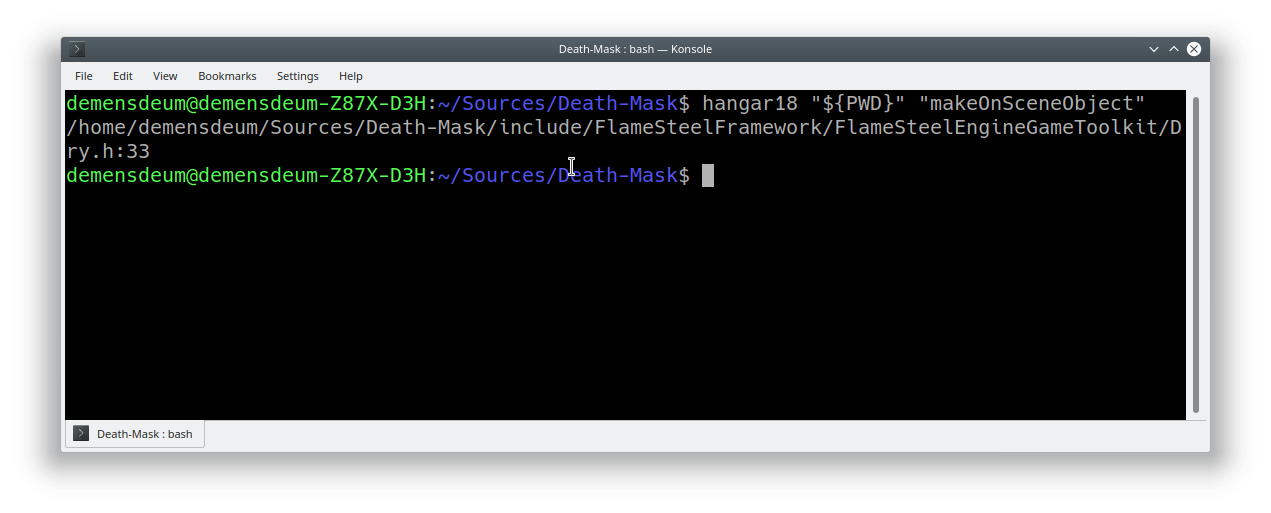
Hangar18 source code indexing utility

Hangar18 is a C++ source code indexing utility written in Rust. This utility will implement the “go to definition” functionality in the Saber-Plus IDE.
The utility receives the absolute path to the source code directory and the declaration line that needs to be found as input. The output is grep-like output.

Source code:
https://gitlab.com/demensdeum/hangar18

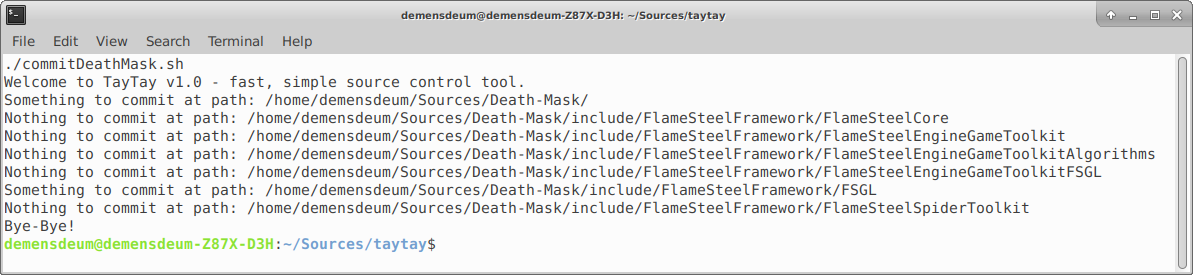
Taytay monitoring the status of Git repositories

I present to your attention Taytay – a utility for monitoring the status of git repositories for the Swift language. At the moment, Swift can be installed on all mainstream desktop operating systems. For Ubuntu, I recommend using Swiftenv. Taytay is tied to the git-cola utility, but you can edit the source code and replace it with any other program.

Source code:
https://gitlab.com/demensdeum/taytay

Rise Programming Language

I present to you my own programming language called – Rise. A transpiler from Rise to JavaScript is currently available.

You can see and use it at the link below – Rise in JavaScript (ECMAScript 5 dialect):
https://gitlab.com/demensdeum/Rise

I also present to your attention a demo application written entirely in Rise:

Rise Demo Application Source Code:
https://gitlab.com/demensdeum/RiseDemoApplication

You can write to me if you have any ideas, suggestions, comments on the new language.

Saber-Plus C++ IDE

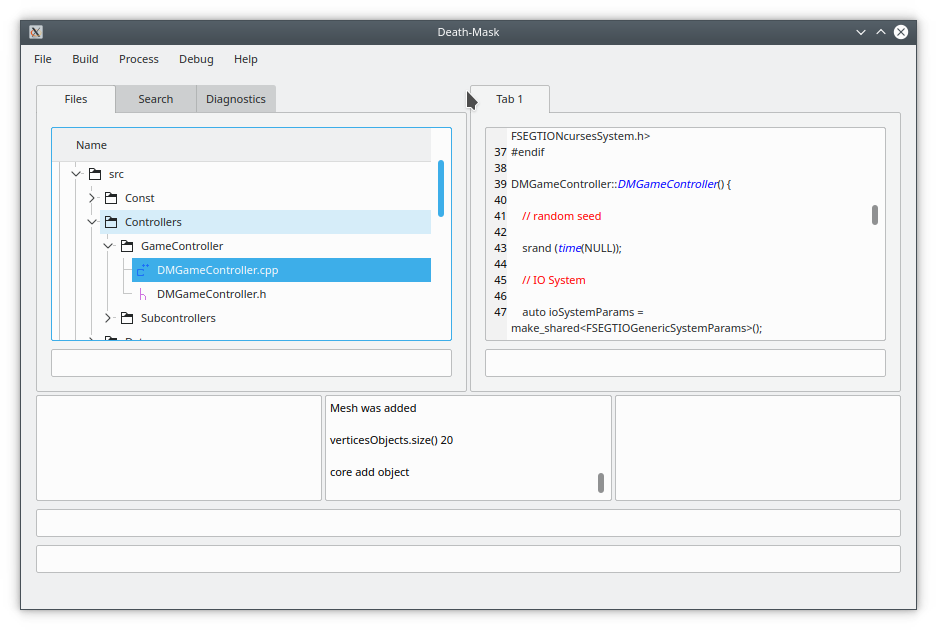
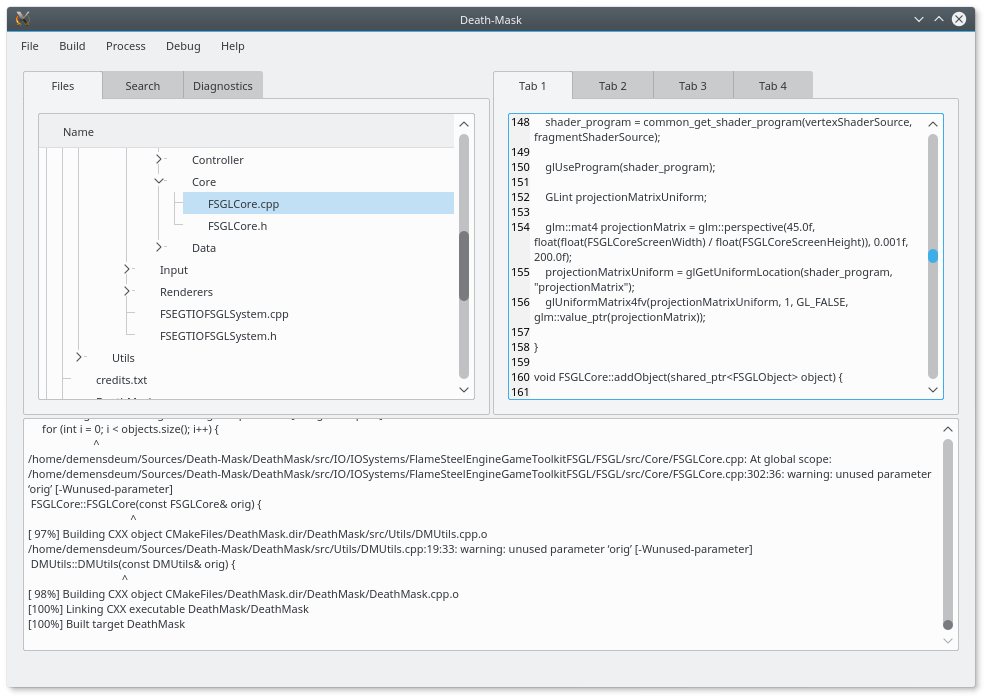
I started developing my own IDE for C++ – Saber-Plus. The main ideas of the new IDE are to be simple, fast and *helpful* in development. At the moment, the source code is available under the MIT license on GitHub, Qt is used to work with the UI. In the future, I plan to transfer all development related to C++ to Saber-Plus – the Death-Mask game will definitely be migrated. More details on the points:

  • Simple – it is planned not to add more than necessary – for example, not to contain source control clients, built-in terminal and similar things. The functionality is focused only on editing the code, analyzing errors. The editor code should be divided into simple classes that correctly perform their part of the work (Unix-way)
  • Fast – refers to both the IDE code base and the editor behavior itself. All actions in the IDE should be as fast as possible, even such often long and complex ones as creating/importing projects.
  • Assistant – analysis of typical errors when writing, compiling code. Correction of errors, warnings at the user’s request. The idea is to add analysis of the application assembly on a specific platform and output of reference information on the installation of the necessary libraries, components.

To build the editor for your operating system, you need to install Qt 5 SDK, download the IDE code from the repository, open the Saber-Plus.pro file in Qt Creator and run the build:

https://github.com/demensdeum/saberplus