…And Primus for All

In this note I will describe the launch of Steam games on the Linux distribution Arch Linux in the configuration of an Intel + Nvidia laptop

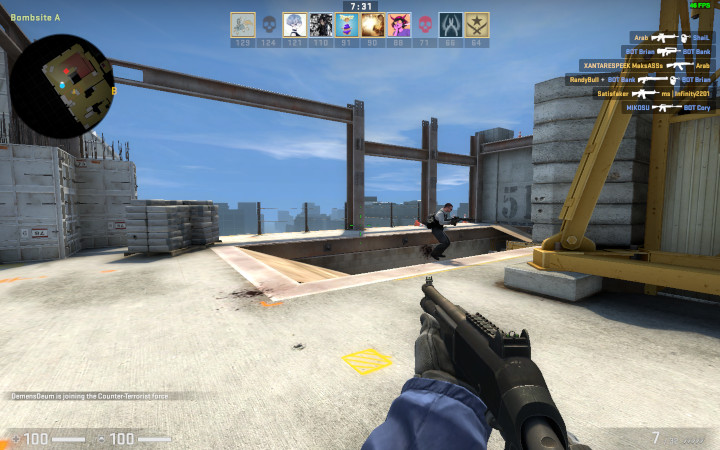
Counter-Strike: Global Offensive

The only configuration that worked for me is Primus-vk + Vulkan.

Install the required packages:
pacman -S vulkan-intel lib32-vulkan-intel nvidia-utils lib32-nvidia-utils vulkan-icd-loader lib32-vulkan-icd-loader primus_vk

Next, add launch options for Counter-Strike: Global Offensive:
pvkrun %command% -vulkan -console -fullscreen

Should work!

Sid Meier’s Civilization VI

Works in conjunction – Primus + OpenGL + LD_PRELOAD.

Install the Primus package:
pacman -S primus

Next, add launch options for Sid Meier’s Civilization VI:
LD_PRELOAD='/usr/lib/libfreetype.so.6:/usr/lib/libbrotlicommon.so.1:/usr/lib/libbrotlidec.so.1' primusrun %command%

LD_PRELOAD pushes the Freetype compression and font libraries.

Dota 2

Works in conjunction – Primus + OpenGL + removal of locks at startup.

Install the Primus package:
pacman -S primus

Next, add launch options for Dota 2:
primusrun %command% -gl -console

If the game doesn’t start with fcntl(5) for /tmp/source_engine_2808995433.lock failed, then try deleting the /tmp/source_engine_2808995433.lock file
rm /tmp/source_engine_2808995433.lock
Usually the lock file is left over from the last game session unless the game was closed naturally.

How to check?

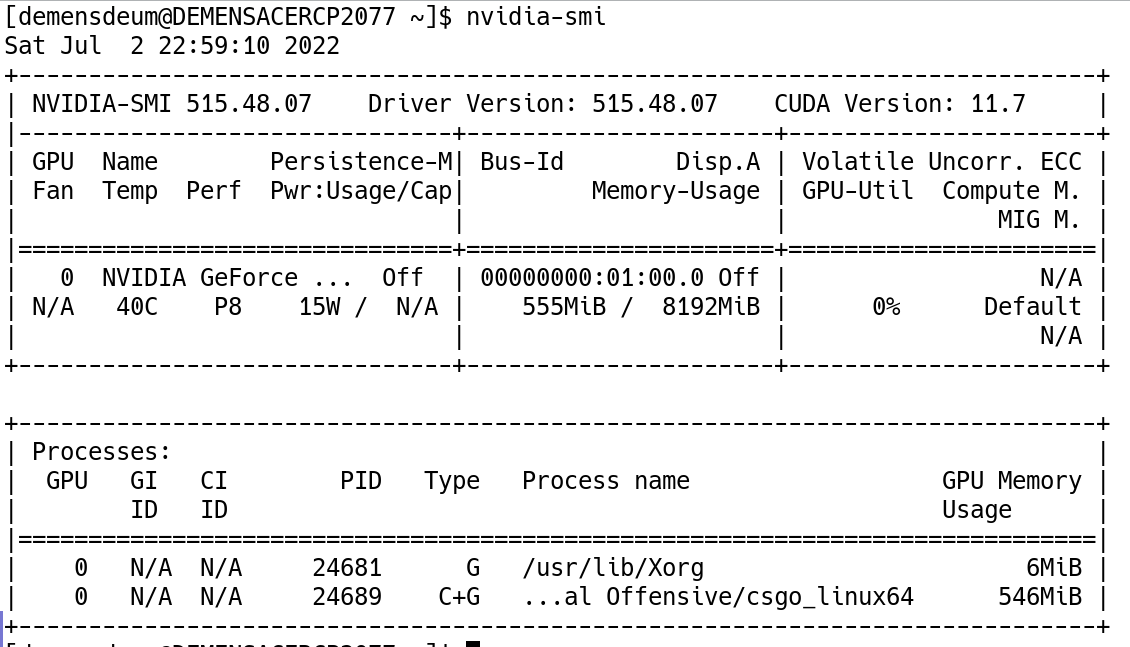
The easiest way to check the launch of applications on a discrete Nvidia graphics card is through the nvidia-smi utility:

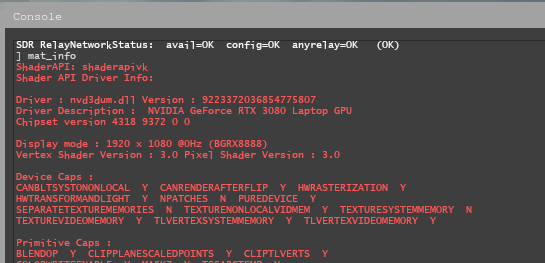
For games on the Source engine, you can check through the game console using the mat_info command:

References

https://wiki.archlinux.org/title/Steam/Game-specific_troubleshooting
https://help.steampowered.com/en/faqs/view/145A-FE54-F37B-278A
https://bbs.archlinux.org/viewtopic.php?id=277708

Sleep Sort

Sleep Sort – sleep sorting, another representative of deterministic strange sorting algorithms.

It works like this:

  1. Loops through a list of elements
  2. A separate thread is started for each cycle
  3. The thread schedules a sleep for the time of the element value and outputs the value after the sleep
  4. At the end of the cycle, we wait for the thread’s longest sleep to complete, and output the sorted list

Example code for sleep sort algorithm in C:

#include <stdlib.h>
#include <pthread.h>
#include <unistd.h>

typedef struct {
    int number;
} ThreadPayload;

void *sortNumber(void *args) {
    ThreadPayload *payload = (ThreadPayload*) args;
    const int number = payload->number;
    free(payload);
    usleep(number * 1000);
    printf("%d ", number);
    return NULL;
}

int main(int argc, char *argv[]) {
    const int numbers[] = {2, 42, 1, 87, 7, 9, 5, 35};
    const int length = sizeof(numbers) / sizeof(int);

    int maximal = 0;
    pthread_t maximalThreadID;

    printf("Sorting: ");
    for (int i = 0; i < length; i++) { pthread_t threadID; int number = numbers[i]; printf("%d ", number); ThreadPayload *payload = malloc(sizeof(ThreadPayload)); payload->number = number;
        pthread_create(&threadID, NULL, sortNumber, (void *) payload);
        if (maximal < number) {
            maximal = number;
            maximalThreadID = threadID;
        }
    }
    printf("\n");
    printf("Sorted: ");
    pthread_join(maximalThreadID, NULL);
    printf("\n");
    return 0;
}

In this implementation I used the usleep function on microseconds with the value multiplied by 1000, i.e. on milliseconds.
The time complexity of the algorithm is O(very long)

Links

https://gitlab.com/demensdeum /algorithms/-/tree/master/sortAlgorithms/sleepSort

Sources

https://codoholicconfessions.wordpress. com/2017/05/21/strangest-sorting-algorithms/
https://twitter.com/javascriptdaily/status/856267407106682880?lang=en
https://stackoverflow.com/questions/6474318/what-is-the-time-complexity-of-the-sleep-sort

Stalin Sort

Stalin Sort – sorting through, one of the algorithms of sorting with data loss.
The algorithm is very productive and efficient, time complexity is O(n).

It works like this:

  1. We loop through the array, comparing the current element with the next one
  2. If the next element is less than the current one, then delete it
  3. As a result, we get a sorted array in O(n)

Example of the algorithm output:

Gulag: [1, 3, 2, 4, 6, 42, 4, 8, 5, 0, 35, 10]
Element 2 sent to Gulag
Element 4 sent to Gulag
Element 8 sent to Gulag
Element 5 sent to Gulag
Element 0 sent to Gulag
Element 35 sent to Gulag
Element 10 sent to Gulag
Numbers: [1, 3, 4, 6, 42]
Gulag: [2, 4, 8, 5, 0, 35, 10]

Python 3 code:

gulag = []

print(f"Numbers: {numbers}")
print(f"Gulag: {numbers}")

i = 0
maximal = numbers[0]

while i < len(numbers):
    element = numbers[i]
    if maximal > element:
        print(f"Element {element} sent to Gulag")
        gulag.append(element)
        del numbers[i]
    else:
        maximal = element        
        i += 1

print(f"Numbers: {numbers}")
print(f"Gulag: {gulag}")

Among the disadvantages, one can note the loss of data, but if we move towards a utopian, ideal, sorted list in O(n), then how else?

Links

https://gitlab.com/demensdeum /algorithms/-/tree/master/sortAlgorithms/stalinSort

Sources

https://github.com/gustavo-depaula/stalin-sort
https://www.youtube.com/shorts/juRL-Xn-E00
https://www.youtube.com/watch?v=L78i2YcyYfk

Selection Sort

Selection Sort – selection sorting algorithm. Selection of what? The minimum number!!!
The time complexity of the algorithm is O(n2)

The algorithm works as follows:

  1. We go through the array in a loop from left to right, remember the current starting index and the number by index, we will call the number A
  2. Inside the loop, we start another one to go from left to right in search of something smaller than A
  3. When we find the smaller one, we remember the index, now the smaller one becomes the number A
  4. When the inner loop ends, swap the number at the starting index with the number A
  5. After the full pass of the upper loop, we get a sorted array

Example of algorithm execution:

(29, 49, 66, 35, 7, 12, 80)
29 > 7
(7, 49, 66, 35, 29, 12, 80)
Round 1 ENDED
Round 2
(7, 49, 66, 35, 29, 12, 80)
49 > 35
35 > 29
29 > 12
(7, 12, 66, 35, 29, 49, 80)
Round 2 ENDED
Round 3
(7, 12, 66, 35, 29, 49, 80)
66 > 35
35 > 29
(7, 12, 29, 35, 66, 49, 80)
Round 3 ENDED
Round 4
(7, 12, 29, 35, 66, 49, 80)
(7, 12, 29, 35, 66, 49, 80)
Round 4 ENDED
Round 5
(7, 12, 29, 35, 66, 49, 80)
66 > 49
(7, 12, 29, 35, 49, 66, 80)
Round 5 ENDED
Round 6
(7, 12, 29, 35, 49, 66, 80)
(7, 12, 29, 35, 49, 66, 80)
Round 6 ENDED
Sorted: (7, 12, 29, 35, 49, 66, 80)

Having failed to find an Objective-C implementation on Rosetta Code, I wrote it myself:

#include <Foundation/Foundation.h>

@implementation SelectionSort
- (void)performSort:(NSMutableArray *)numbers
{
   NSLog(@"%@", numbers);   
   for (int startIndex = 0; startIndex < numbers.count-1; startIndex++) {
      int minimalNumberIndex = startIndex;
      for (int i = startIndex + 1; i < numbers.count; i++) {
         id lhs = [numbers objectAtIndex: minimalNumberIndex];
         id rhs = [numbers objectAtIndex: i];
         if ([lhs isGreaterThan: rhs]) {
            minimalNumberIndex = i;
         }
      }
      id temporary = [numbers objectAtIndex: minimalNumberIndex];
      [numbers setObject: [numbers objectAtIndex: startIndex] 
               atIndexedSubscript: minimalNumberIndex];
      [numbers setObject: temporary
               atIndexedSubscript: startIndex];
   }
   NSLog(@"%@", numbers);
}

@end 

Собрать и запустить можно либо на MacOS/Xcode, либо на любой операционной системе поддерживающей GNUstep, например у меня собирается Clang на Arch Linux.
Скрипт сборки:

        main.m \
        -lobjc \
        `gnustep-config --objc-flags` \
        `gnustep-config --objc-libs` \
        -I /usr/include/GNUstepBase \
        -I /usr/lib/gcc/x86_64-pc-linux-gnu/12.1.0/include/ \
        -lgnustep-base \
        -o SelectionSort \

Links

https://gitlab.com/demensdeum/algorithms/-/tree/master/sortAlgorithms/selectionSort

Sources

https://rosettacode.org/wiki/Sorting_algorithms/Selection_sort
https://ru.wikipedia.org/wiki/Сортировка_выбором
https://en.wikipedia.org/wiki/Selection_sort
https://www.youtube.com/watch?v=LJ7GYbX7qpM

Counting Sort

Counting sort – the algorithm of sorting by counting. What do you mean? Yes! Just like that!

The algorithm involves at least two arrays, the first is a list of integers to be sorted, the second is an array of size = (maximum number – minimum number) + 1, initially containing only zeros. Then the numbers from the first array are sorted, the index in the second array is obtained by the number element, which is incremented by one. After going through the entire list, we get a completely filled second array with the number of repetitions of numbers from the first. The algorithm has a serious overhead – the second array also contains zeros for numbers that are not in the first list, the so-called memory overhead.

After receiving the second array, we iterate over it and write the sorted version of the number by index, decrementing the counter to zero. The initially zero counter is ignored.

An example of unoptimized operation of the counting sort algorithm:

  1. Input array 1,9,1,4,6,4,4
  2. Then the array to count will be 0,1,2,3,4,5,6,7,8,9 (minimum number 0, maximum 9)
  3. With final counters 0,2,0,0,3,0,1,0,0,1
  4. Total sorted array 1,1,4,4,4,6,9

Algorithm code in Python 3:


numbers = [42, 89, 69, 777, 22, 35, 42, 69, 42, 90, 777]

minimal = min(numbers)
maximal = max(numbers)
countListRange = maximal - minimal
countListRange += 1
countList = [0] * countListRange

print(numbers)
print(f"Minimal number: {minimal}")
print(f"Maximal number: {maximal}")
print(f"Count list size: {countListRange}")

for number in numbers:
    index = number - minimal
    countList[index] += 1

replacingIndex = 0
for index, count in enumerate(countList):
    for i in range(count):
        outputNumber = minimal + index
        numbers[replacingIndex] = outputNumber
        replacingIndex += 1

print(numbers)

Из-за использования двух массивов, временная сложность алгоритма O(n + k)

Ссылки

https://gitlab.com/demensdeum/algorithms/-/tree/master/sortAlgorithms/countingSort

Источники

https://www.youtube.com/watch?v=6dk_csyWif0
https://www.youtube.com/watch?v=OKd534EWcdk
https://en.wikipedia.org/wiki/Counting_sort
https://rosettacode.org/wiki/Sorting_algorithms/Counting_sort
https://pro-prof.com/forums/topic/%D0%B0%D0%BB%D0%B3%D0%BE%D1%80%D0%B8%D1%82%D0%BC-%D1%81%D0%BE%D1%80%D1%82%D0%B8%D1%80%D0%BE%D0%B2%D0%BA%D0%B8-%D0%BF%D0%BE%D0%B4%D1%81%D1%87%D0%B5%D1%82%D0%BE%D0%BC

Bogosort

Pseudo-sort or swamp sort, one of the most useless sorting algorithms.

It works like this:
1. An array of numbers is fed to the input
2. An array of numbers is shuffled randomly
3. Check if the array is sorted
4. If not sorted, the array is shuffled again
5. This whole process is repeated until the array is sorted randomly.

As you can see, the performance of this algorithm is terrible, smart people think that even O(n * n!), i.e. there is a chance to get stuck throwing dice for the glory of the god of chaos for many years, the array will still not be sorted, or maybe it will be sorted?

Implementation

To implement it in TypeScript, I needed to implement the following functions:
1. Shuffling an array of objects
2. Comparison of arrays
3. Generate a random number in the range from zero to a number (sic!)
4. Print progress, because it seems like sorting is going on forever

Below is the implementation code in TypeScript:

const randomInteger = (maximal: number) => Math.floor(Math.random() * maximal);
const isEqual = (lhs: any[], rhs: any[]) => lhs.every((val, index) => val === rhs[index]);
const shuffle = (array: any[]) => {
    for (var i = 0; i < array.length; i++) { var destination = randomInteger(array.length-1); var temp = array[i]; array[i] = array[destination]; array[destination] = temp; } } let numbers: number[] = Array.from({length: 10}, ()=>randomInteger(10));
const originalNumbers = [...numbers];
const sortedNumbers = [...numbers].sort();

let numberOfRuns = 1;

do {
    if (numberOfRuns % 1000 == 0) {
        printoutProcess(originalNumbers, numbers, numberOfRuns);
    }
    shuffle(numbers);
    numberOfRuns++;
} while (isEqual(numbers, sortedNumbers) == false)

console.log(`Success!`);
console.log(`Run number: ${numberOfRuns}`)
console.log(`Original numbers: ${originalNumbers}`);
console.log(`Current numbers: ${originalNumbers}`);
console.log(`Sorted numbers: ${sortedNumbers}`);

Для отладки можно использовать VSCode и плагин TypeScript Debugger от kakumei.

Как долго

Вывод работы алгоритма:

src/bogosort.ts:1
Still trying to sort: 5,4,8,7,5,0,2,9,7,2, current shuffle 8,7,0,2,4,7,2,5,9,5, try number: 145000
src/bogosort.ts:2
Still trying to sort: 5,4,8,7,5,0,2,9,7,2, current shuffle 7,5,2,4,9,8,0,5,2,7, try number: 146000
src/bogosort.ts:2
Still trying to sort: 5,4,8,7,5,0,2,9,7,2, current shuffle 0,2,7,4,9,5,7,5,8,2, try number: 147000
src/bogosort.ts:2
Still trying to sort: 5,4,8,7,5,0,2,9,7,2, current shuffle 5,9,7,8,5,4,2,7,0,2, try number: 148000
src/bogosort.ts:2
Success!
src/bogosort.ts:24
Run number: 148798
src/bogosort.ts:25
Original numbers: 5,4,8,7,5,0,2,9,7,2
src/bogosort.ts:26
Current numbers: 5,4,8,7,5,0,2,9,7,2
src/bogosort.ts:27
Sorted numbers: 0,2,2,4,5,5,7,7,8,9

Для массива из 10 чисел Богосорт перемешивал исходный массив 148798 раз, многовато да?
Алгоритм можно использовать как учебный, для понимания возможностей языка с которым предстоит работать на рынке. Лично я был удивлен узнав что в ванильных JS и TS до сих пор нет своего алгоритма перемешивания массивов, генерации целого числа в диапазоне, доступа к хэшам объектов для быстрого сравнения.

Ссылки

https://gitlab.com/demensdeum/algorithms/-/tree/master/sortAlgorithms/bogosort
https://www.typescriptlang.org/
https://marketplace.visualstudio.com/items?itemName=kakumei.ts-debug

Источники

https://www.youtube.com/watch?v=r2N3scbd_jg
https://en.wikipedia.org/wiki/Bogosort

GoF Patterns

List of Gang of Four patterns – the very patterns that can get you flunked at an interview.

Generative Patterns

Structural patterns

Patterns of behavior

Pattern Interpreter

What’s included

The Interpreter pattern is a Behavioral design pattern. This pattern allows you to implement your own programming language by working with an AST tree, the nodes of which are terminal and non-terminal expressions that implement the Interpret method, which provides the functionality of the language.

  • Terminal expression – for example, the string constant – “Hello World”
  • A non-terminal expression – for example Print(“Hello World”) – contains Print and the argument from the Terminal expression “Hello World”

What is the difference? The difference is that interpretation ends on terminal expressions, and for non-terminal expressions it continues in depth along all incoming nodes/arguments. If the AST tree consisted only of non-terminal expressions, then the application execution would never be completed, since some finiteness of any process is required, and this finiteness is represented by terminal expressions, they usually contain data, such as strings.

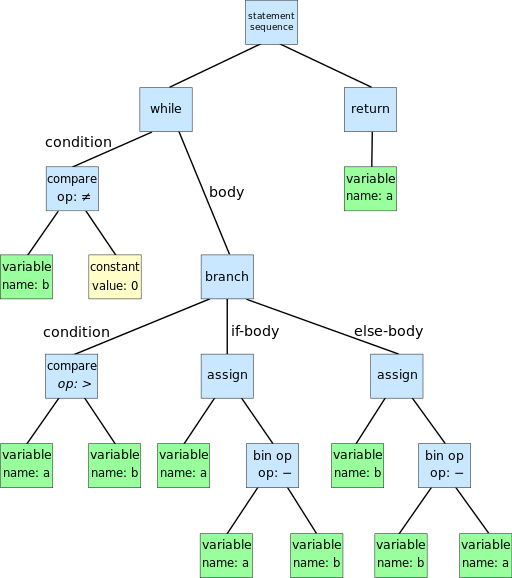
An example of an AST tree is below:


Dcoetzee, CC0, via Wikimedia Commons

As you can see, terminal expressions are constant and variable, non-terminal expressions are the rest.

What is not included

The implementation of the Interpreter does not include parsing the language string input into an AST tree. It is enough to implement classes of terminal, non-terminal expressions, Interpret methods with the Context argument at the input, format the AST tree from expressions, and run the Interpret method at the root expression. The context can be used to store the application state during execution.

Implementation

The pattern involves:

  • Client – ​​returns the AST tree and runs Interpret(context) for the root node (Client)
  • Context – contains the state of the application, passed to expressions during interpretation (Context)
  • Abstract expression – an abstract class containing the Interpret(context) (Expression) method
  • A terminal expression is a final expression, a descendant of an abstract expression (TerminalExpression)
  • A non-terminal expression is not a final expression, it contains pointers to nodes deep in the AST tree, subordinate nodes usually affect the result of interpreting the non-terminal expression (NonTerminalExpression)

C# Client Example

        static void Main(string[] args)
        {
            var context = new Context();
            var initialProgram = new PerformExpression(
                new IExpression[] {
                    new SetExpression("alpha", "1"),
                    new GetExpression("alpha"),
                    new PrintExpression(
                        new IExpression[] {
                            new ConstantExpression("Hello Interpreter Pattern")
                        }
                    )
                }
            );
            System.Console.WriteLine(initialProgram.interpret(context));
        }
}

Abstract Expression Example in C#

{
    String interpret(Context context);
}

Example of Terminal Expression in C# (String Constant)

{
    private String constant;

    public ConstantExpression(String constant) {
        this.constant = constant;
    }

    override public String interpret(Context context) {
        return constant;
    }
}

Example of Non-Terminal Expression in C# (Start and concatenate results of subordinate nodes, using the separator “;”

{
    public PerformExpression(IExpression[] leafs) : base(leafs) {
        this.leafs = leafs;
    }
    
    override public String interpret(Context context) {
        var output = "";
        foreach (var leaf in leafs) {
            output += leaf.interpret(context) + ";";
        }
        return output;
    }
}

Can you do it functionally?

As we know, all Turing-complete languages ​​are equivalent. Is it possible to transfer the Object-Oriented pattern to the Functional programming language?

For the experiment, we can take the FP language for the web called Elm. Elm does not have classes, but it does have Records and Types, so the following records and types are involved in the implementation:

  • Expression – an enumeration of all possible expressions of the language (Expression)
  • Subordinate expression – an expression that is subordinate to a Nonterminal expression (ExpressionLeaf)
  • Context – a record that stores the state of the application (Context)
  • Functions implementing Interpret(context) methods – all necessary functions implementing the functionality of Terminal, Non-terminal expressions
  • Auxiliary records of the Interpreter state – necessary for the correct operation of the Interpreter, store the state of the Interpreter, context

An example of a function implementing interpretation for the entire set of possible expressions in Elm:

  case input.expression of
    Constant text ->
      { 
        output = text, 
        context = input.context 
      }
    Perform leafs ->
      let inputs = List.map (\leaf -> { expressionLeaf = leaf, context = input.context } ) leafs in
        let startLeaf = { expressionLeaf = (Node (Constant "")), context = { variables = Dict.empty } } in
          let outputExpressionInput = List.foldl mergeContextsAndRunLeafs startLeaf inputs in
            {
              output = (runExpressionLeaf outputExpressionInput).output,
              context = input.context
            }
    Print printExpression ->
      run 
      { 
        expression = printExpression, 
        context = input.context 
      }
    Set key value ->
      let variables = Dict.insert key value input.context.variables in
      {
        output = "OK",
        context = { variables = variables }
      }
    Get key ->
      {
        output = Maybe.withDefault ("No value for key: " ++ key) (Dict.get key input.context.variables),
        context = input.context
      }

And parse?

Parsing source code into an AST tree is not part of the Interpreter pattern, there are several approaches to parsing source code, but we’ll talk about that some other time.
In the implementation of the Interpreter for Elm, I wrote the simplest parser in the AST tree, consisting of two functions – parsing the node, parsing the subordinate nodes.

parseLeafs state =
    let tokensQueue = state.tokensQueue in
        let popped = pop state.tokensQueue in
            let tokensQueueTail = tail state.tokensQueue in
                if popped == "Nothing" then
                    state
                else if popped == "Perform(" then
                    {
                        tokensQueue = tokensQueue,
                        result = (state.result ++ [Node (parse tokensQueue)])
                    }
                else if popped == ")" then
                    parseLeafs {
                        tokensQueue = tokensQueueTail,
                        result = state.result
                    }
                else if popped == "Set" then
                    let key = pop tokensQueueTail in
                        let value = pop (tail tokensQueueTail) in
                            parseLeafs {
                                tokensQueue = tail (tail tokensQueueTail),
                                result = (state.result ++ [Node (Set key value)])
                            }
                else if popped == "Get" then
                    let key = pop tokensQueueTail in
                        parseLeafs {
                            tokensQueue = tail tokensQueueTail,
                            result = (state.result ++ [Node (Get key)])
                        }
                else 
                    parseLeafs {
                        tokensQueue = tokensQueueTail,
                        result = (state.result ++ [Node (Constant popped)])
                    }

parse tokensQueue =
    let popped = pop tokensQueue in
        let tokensQueueTail = tail tokensQueue in
            if popped == "Perform(" then
                Perform (
                    parseLeafs {
                        tokensQueue = tokensQueueTail, 
                        result = []
                    }
                ).result
            else if popped == "Set" then
                let key = pop tokensQueueTail in
                    let value = pop (tail tokensQueueTail) in
                        Set key value
            else if popped == "Print" then
                Print (parse tokensQueueTail)
            else
                Constant popped

Links

https://gitlab.com/demensdeum /patterns/-/tree/master/interpreter/elm
https://gitlab.com/demensdeum/patterns/-/tree/master/interpreter/csharp

Sources

https://en.wikipedia.org/wiki/Interpreter_pattern
https://elm-lang.org/
https://docs.microsoft.com/en-us/dotnet/csharp/

RGB image to grayscale

In this note I will describe the algorithm for converting an RGB buffer to grayscale.
And this is done quite simply, each pixel of the buffer’s color channel is transformed according to a certain formula and the output is a gray image.
Average method:

red = average;
green = average;
blue = average;

Складываем 3 цветовых канала и делим на 3.

Однако существует еще один метод – метод средневзвешенный, он учитывает цветовосприятие человека:

red = luminance;
green = luminance;
blue = luminance;

Какой метод лучше использовать? Да какой вам больше подходит для конкретной задачи. Далее сравнение методов с помощью тестовой цветовой сетки:

Пример реализации на JavaScript + HTML 5

    image,
    canvas,
    weightedAverage
) {
    const context = canvas.getContext('2d');

    const imageWeight = image.width;
    const imageHeight = image.height;

    canvas.width = imageWeight;
    canvas.height = imageHeight;

    context.drawImage(image, 0, 0);

    let pixels = context
        .getImageData(
            0,
            0,
            imageWeight,
            imageHeight
        );

    for (let y = 0; y & lt; pixels.height; y++) {
        for (let x = 0; x & lt; pixels.width; x++) {
            const i = (y * 4) * pixels.width + x * 4;

            let red = pixels.data[i];
            let green = pixels.data[i + 1];
            let blue = pixels.data[i + 2]

            const average = (red + green + blue) / 3;
            const luminance = 0.2126 * red +
                0.7152 * green +
                0.0722 * blue;

            red = weightedAverage ? luminance : average;
            green = weightedAverage ? luminance : average;
            blue = weightedAverage ? luminance : average;

            pixels.data[i] = red;
            pixels.data[i + 1] = green;
            pixels.data[i + 2] = blue;
        }
    }
    context
        .putImageData(
            pixels,
            0,
            0,
            0,
            0,
            pixels.width,
            pixels.height
        );
}

Источники

https://www.baeldung.com/cs/convert-rgb-to-grayscale
https://twitter.com/mudasobwa/status/1528046455587495940
https://rosettacode.org/wiki/Grayscale_image

Ссылки

http://papugi.demensdeum.repl.co/

Благодарности

Спасибо Aleksei Matiushkin (https://twitter.com/mudasobwa) за наводку на Rosetta Code

Turing Computing Machines

I present to your attention a translation of the first pages of Alan Turing’s article “ON COMPUTABLE NUMBERS WITH AN APPLICATION TO THE RESOLUTION PROBLEM” from 1936. The first chapters contain a description of the computing machines that later became the basis for modern computing technology.

The full translation of the article and an explanation can be read in the book by the American popularizer Charles Petzold, entitled “Reading Turing. A Journey Through Turing’s Historic Article on Computability and Turing Machines” (ISBN 978-5-97060-231-7, 978-0-470-22905-7)

Original article:
https://www.astro.puc.cl/~rparra/tools/PAPERS/turing_1936.pdf

ON COMPUTABLE NUMBERS WITH AN APPLICATION TO THE DECISION PROBLEM

A. M. TURING

[Received May 28, 1936 – Read November 12, 1936]

“Computable” numbers may be briefly described as real numbers whose expressions as decimal fractions are computable by a finite number of means. Although numbers are at first glance considered computable in this paper, it is almost as easy to define and study computable functions of an integer variable, a real variable, a computable variable, computable predicates, and the like. However, the fundamental problems associated with these computable objects are the same in each case. I have chosen computable numbers as the computable object for our detailed consideration because the methodology for considering them is the least cumbersome. I hope to describe soon the relationships of computable numbers to computable functions, and so forth, involving research in the theory of functions of a real variable expressed in terms of computable numbers. By my definition, a real number is computable if its decimal representation can be written down by a machine.

In sections 9 and 10 I give some arguments to show that computable numbers include all numbers that are naturally considered computable. In particular, I show that some large classes of numbers are computable. These include, for example, the real parts of all algebraic numbers, the real parts of the zeros of the Bessel functions, the numbers π, e, and so on. However, computable numbers do not include all definable numbers, as is demonstrated by an example of a definable number that is not computable.

Although the class of computable numbers is very large and in many ways similar to the class of real numbers, it is still enumerable. In §8 I consider certain arguments that seem to prove the opposite assumption. When one of these arguments is applied correctly, it leads to conclusions that at first glance are similar to those of Gödel.* These results have extremely important applications. In particular, as shown below (§11), the decision problem cannot have a solution.

In a recent paper, Alonzo Church** introduced the idea of ​​”effective calculability”, which is equivalent to my idea of ​​”computability” but has a completely different definition. Church also comes to similar conclusions about the resolution problem. A proof of the equivalence of “computability” and “effective calculability” is given in the appendix to this paper.

1. Computing machines

We have already said that computable numbers are those whose decimal places are computable by finite means. A more precise definition is required here. No real attempt will be made in this paper to justify the definitions given here until we reach §9. For now I will merely note that the (logical) justification (for this) is that human memory is necessarily limited.

Let us compare a man in the process of calculating a real number with a machine that is capable of fulfilling only a finite number of conditions q1, q2, …, qR; let us call these conditions “m-configurations”. The given (i.e. so defined) machine is equipped with a “tape” (analogous to paper). Such a tape, passing through the machine, is divided into sections. Let us call them “squares”. Each such square can contain some “symbol”. At any moment there exists and, moreover, only one such square, say, the r-th, containing the symbol that is “in the given machine”. Let us call such a square a “scanned symbol”. A “scanned symbol” is the only such symbol of which the machine, figuratively speaking, is “directly aware”. However, when changing its m-configuration, the machine can effectively remember some symbols that it “saw” (scanned) earlier. The possible behavior of the machine at any moment is determined by the m-configuration qn and the scanned symbol***. Let us call this pair of symbols qn, a “configuration”. A configuration so designated determines the possible behavior of the machine. In some of these configurations, in which the scanned square is empty (i.e., does not contain a symbol), the machine writes a new symbol on the scanned square, and in other of these configurations it erases the scanned symbol. The machine can also move on to scanning another square, but in this case it can only move to the adjacent square to the right or left. In addition to any of these operations, the m-configuration of the machine can be changed. In this case, some of the written symbols will form a sequence of digits that is the decimal part of the real number being calculated. The rest will be no more than fuzzy marks to “help the memory”. In this case, only the fuzzy marks mentioned above can be erased.

I claim that the operations considered here include all those used in computing. The reason for this claim is easier to understand for a reader with some understanding of machine theory. Therefore, in the next section I will continue to develop the theory under consideration, relying on an understanding of the meaning of the terms “machine”, “tape”, “scanned”, etc.

*Goedel, “On the Formally Undecidable Propositions of the Principles of Mathematics (published by Whitehead and Russell in 1910, 1912 and 1913) and Related Systems, Part I,” Journal of Mathematical Physics, Monthly Bulletin in German, No. 38 (for 1931, pp. 173-198).
** Alonzo Church, “An Unsolvable Problem in Elementary Number Theory,” American J. of Math., no. 58 (1936), pp. 345-363.
*** Alonzo Church, “A Note on the Resolution Problem,” J. of Symbolic Logic, no. 1 (1936), pp. 40-41

Turing Bomb

In 1936, scientist Alan Turing in his publication “On Computable Numbers, With An Application to Entscheidungsproblem” describes the use of a universal computing machine that could put an end to the question of the solvability problem in mathematics. As a result, he comes to the conclusion that such a machine would not be able to solve anything correctly if the result of its work was inverted and looped back to itself. It turns out that it is impossible to create an *ideal* antivirus, an *ideal* tile layer, a program that suggests ideal phrases for your crash, etc. Paradox!

However, this universal computing machine can be used to implement any algorithm, which is what British intelligence took advantage of by hiring Turing and allowing him to create the “Bombe” machine to decipher German messages during World War II.

The following is an OOP simulation of a single-tape computer in Dart, based on the original document.

A Turing machine consists of a film divided into sections, each section contains a symbol, the symbols can be read or written. An example of a film class:

final _map = Map<int, String>(); 

  String read({required int at}) { 
    return _map[at] ?? ""; 
  } 

  void write({required String symbol, required int at}) { 
    _map[at] = symbol; 
  } 
}

There is also a “scanning square”, it can move along the film, read or write information, in modern language – a magnetic head. An example of a magnetic head class:

  int _index = 0; 
  InfiniteTape _infiniteTape; 
  TapeHead(this._infiniteTape) {} 

  String next() { 
    _index += 1; 
    move(to: _index); 
    final output = read(); 
    return output; 
  } 

  String previous() { 
    _index -= 1; 
    move(to: _index); 
    final output = read(); 
    return output; 
  } 

  void move({required int to}) { 
    this._index = to; 
  } 

  String read() { 
    return _infiniteTape.read(at: this._index); 
  } 

  void write(String symbol) { 
    _infiniteTape.write(symbol: symbol, at: this._index); 
  } 

  int index() { 
    return _index; 
  } 
} 

The machine contains “m-configurations” by which it can decide what to do next. In modern language, these are states and state handlers. An example of a state handler:

  FiniteStateControlDelegate? delegate = null; 

  void handle({required String symbol}) { 
    if (symbol == OPCODE_PRINT) { 
      final argument = delegate?.nextSymbol(); 
      print(argument);
    } 
    else if (symbol == OPCODE_GENERATE_RANDOM_NUMBER_FROM_ZERO_TO_AND_WRITE_AFTER) { 
      final to = int.tryParse(delegate!.nextSymbol())!; 
      final value = new Random().nextInt(to); 
      delegate!.nextSymbol(); 
      delegate!.write(value.toString()); 
    } 
    else if (symbol == OPCODE_INPUT_TO_NEXT) { 
      final input = stdin.readLineSync()!; 
      delegate?.nextSymbol(); 
      delegate?.write(input); 
    } 
    else if (symbol == OPCODE_COPY_FROM_TO) { 
      final currentIndex = delegate!.index(); 

и т.д. 

After this, you need to create “configurations”, in modern language these are operation codes (opcodes), their handlers. An example of opcodes:

const OPCODE_PRINT = "print"; 
const OPCODE_INCREMENT_NEXT = "increment next"; 
const OPCODE_DECREMENT_NEXT = "decrement next"; 
const OPCODE_IF_PREVIOUS_NOT_EQUAL = "if previous not equal"; 
const OPCODE_MOVE_TO_INDEX = "move to index"; 
const OPCODE_COPY_FROM_TO = "copy from index to index"; 
const OPCODE_INPUT_TO_NEXT = "input to next"; 
const OPCODE_GENERATE_RANDOM_NUMBER_FROM_ZERO_TO_AND_WRITE_AFTER = "generate random number from zero to next and write after"; 

Don’t forget to create an opcode and a stop handler, otherwise you won’t be able to prove or not prove (sic!) the resolution problem.

Now, using the “mediator” pattern, we connect all the classes in the Turing Machine class, create an instance of the class, record the programs on tape using a tape recorder, load the tape and you can use it!

For me personally, the question of what came first remains interesting: the creation of a universal computer or the proof of the “Entscheidungsproblem”, which resulted in the computer appearing as a by-product.

Cassettes

For fun, I recorded several cassette programs for my version of the machine.

Hello World

hello world 
stop

Считаем до 16-ти

0
if previous not equal
16
copy from index to index
1
8
print
?
move to index
0
else
copy from index to index
1
16
print
?
print
Finished!
stop

Самой интересной задачей было написание Quine программы, которая печатает свой исходный код, для одноленточной машины. Первые 8 часов мне казалось что эта задача не решаема с таким малым количеством опкодов, однако всего через 16 часов оказалось что я был не прав.

Реализация и примеры кассет, источники ниже.

Ссылки

https://gitlab.com/demensdeum/turing-machine

Источники

https://www.astro.puc.cl/~rparra/tools/PAPERS/turing_1936.pdf
https://kpolyakov.spb.ru/prog/turing.htm
https://www.youtube.com/watch?v=dNRDvLACg5Q
https://www.youtube.com/watch?v=jP3ceURvIYc
https://www.youtube.com/watch?v=9QCJj5QzETI
https://www.youtube.com/watch?v=HeQX2HjkcNo&t=0s

Writing Assembler for Sega Genesis #5

In this post I will describe the process of reading the joystick, changing the sprite position, horizontal flip, Sega Genesis emulator and potentially the console itself.

Reading of presses, processing of “events” of the Sega joystick occurs according to the following scheme:

  1. Request for combination of bits of pressed buttons
  2. Reading bits of pressed buttons
  3. Processing at the game logic level

To move the skeleton sprite we need to store the current position variables.

RAM

Game logic variables are stored in RAM, people haven’t come up with anything better yet. Let’s declare variable addresses, change the rendering code:

skeletonYpos = $FF0002 
frameCounter = $FF0004 
skeletonHorizontalFlip = $FF0006

    move.w #$0100,skeletonXpos 
    move.w #$0100,skeletonYpos 
    move.w #$0001,skeletonHorizontalFlip 

FillSpriteTable: 
    move.l #$70000003,vdp_control_port 
    move.w skeletonYpos,vdp_data_port  
    move.w #$0F00,vdp_data_port 
    move.w skeletonHorizontalFlip,vdp_data_port 
    move.w skeletonXpos,vdp_data_port 

As you can see, the address available for work starts at 0xFF0000 and ends at 0xFFFFFF, so we have 64 KB of memory available. Skeleton positions are declared at skeletonXpos, skeletonYpos, horizontal flip at skeletonHorizontalFlip.

Joypad

Similar to VDP, joypads are handled via two separate ports – the control port and the data port, for the first one it’s 0xA10009 and 0xA10003 respectively. When working with a joypad, there’s one interesting feature – first you need to request a combination of buttons for polling, and then, after waiting for the bus update, read the required presses. For the C/B buttons and the cross, it’s 0x40, an example below:

  move.b #$40,joypad_one_control_port; C/B/Dpad 
  nop ; bus sync 
  nop ; bus sync 
  move.b joypad_one_data_port,d2 
  rts 

The state of the buttons pressed or not pressed will remain in the d2 register, in general, what was requested via the data port will remain. After that, go to the Motorola 68000 register viewer of your favorite emulator, see what the d2 register is equal to depending on the presses. You can find this out in the manual in a smart way, but we don’t take your word for it. Next, processing the pressed buttons in the d2 register

    cmp #$FFFFFF7B,d2; handle left 
    beq MoveLeft  
    cmp #$FFFFFF77,d2; handle right  
    beq MoveRight  
    cmp #$FFFFFF7E,d2; handle up  
    beq MoveUp  
    cmp #$FFFFFF7D,d2; handle down  
    beq MoveDown  
    rts

Проверять нужно конечно отдельные биты, а не целыми словами, но пока и так сойдет. Теперь осталось самое простое – написать обработчики всех событий перемещения по 4-м направлениям. Для этого меняем переменные в RAM, и запускаем процедуру перерисовки.

Пример для перемещения влево + изменение горизонтального флипа:

    move.w skeletonXpos,d0 
    sub.w #1,d0 
    move.w d0,skeletonXpos 
    move.w #$0801,skeletonHorizontalFlip 
    jmp FillSpriteTable

После добавления всех обработчиков и сборки, вы увидите как скелет перемещается и поворачивается по экрану, но слишком быстро, быстрее самого ежа Соника.

Не так быстро!

Чтобы замедлить скорость игрового цикла, существуют несколько техник, я выбрал самую простую и не затрагивающую работу с внешними портами – подсчет цифры через регистр пока она не станет равна нулю.

Пример замедляющего цикла и игрового цикла:

  move.w #512,frameCounter 
WaitFrame: 
  move.w frameCounter,d0 
  sub.w #1,d0 
  move.w d0,frameCounter 
  dbra d0,WaitFrame 
GameLoop: 
  jsr ReadJoypad 
  jsr HandleJoypad 
  jmp GameLoop 

After that, the skeleton runs slower, which is what was required. As far as I know, the most common option for “slowing down” is counting the vertical sync flag, you can count how many times the screen was drawn, thus tying it to a specific fps.

Links

https://gitlab .com/demensdeum/segagenesisamples/-/blob/main/8Joypad/vasm/main.asm

Sources

https://www.chibiakumas.com/68000/platform2.php
https://huguesjohnson.com/programming/genesis/tiles-sprites/

Writing Assembler for Sega Genesis #4

In this note I will describe how to draw sprites using the VDP emulator of the Sega Genesis console.
The process of rendering sprites is very similar to rendering tiles:

  1. Loading colors into CRAM
  2. Unloading 8×8 sprite parts into VRAM
  3. Filling Sprite Table in VRAM

For example, let’s take a sprite of a skeleton with a sword 32×32 pixels

Skeleton Guy [Animated] by Disthorn

CRAM

Using ImaGenesis we will convert it into CRAM colors and VRAM patterns for assembler. After that we will get two files in asm format, then we will rewrite the colors to word size, and the tiles should be put in the correct order for drawing.
Interesting information: you can switch the VDP autoincrement via register 0xF to the word size, this will allow you to remove the address increment from the CRAM color fill code.

VRAM

The Sega manual has the correct tile order for large sprites, but we’re smarter, so we’ll take the indexes from the ChibiAkumas blog, starting the count from index 0:

0 4 8 12

1 5 9 13

2 6 10 14

3 7 11 15

Why is everything upside down? What do you expect, the prefix is ​​Japanese! It could have been from right to left!
Let’s change the order manually in the sprite asm file:

	dc.l	$11111111	; Tile #0 
	dc.l	$11111111 
	dc.l	$11111111 
	dc.l	$11111111 
	dc.l	$11111111 
	dc.l	$11111111 
	dc.l	$11111111 
	dc.l	$11111111 
	dc.l	$11111111	; Tile #4 
	dc.l	$11111111 
	dc.l	$11111111 
	dc.l	$11111111 
	dc.l	$11111111 
	dc.l	$11111111 
	dc.l	$11111111 
	dc.l	$11111111
	dc.l	$11111111	; Tile #8 
	dc.l	$11111111 
	dc.l	$11111111 
	dc.l	$11111111 
	dc.l	$11111111 
	dc.l	$11111122 
	dc.l	$11111122 
	dc.l	$11111166 
	dc.l	$11111166	; Tile #12 
	dc.l	$11111166 
	dc.l	$11111166 
	и т.д. 

Load the sprite like regular tiles/patterns:

  lea Sprite,a0 
  move.l #$40200000,vdp_control_port; write to VRAM command 
  move.w #128,d0 ; (16*8 rows of sprite) counter 
SpriteVRAMLoop: 
  move.l (a0)+,vdp_data_port; 
  dbra d0,SpriteVRAMLoop 

To draw the sprite, it remains to fill the sprite table (Sprite Table)

Sprite Table

The sprite table is filled in VRAM, its location address is set in VDP register 0x05, the address is again tricky, you can look it up in the manual, an example for address F000:

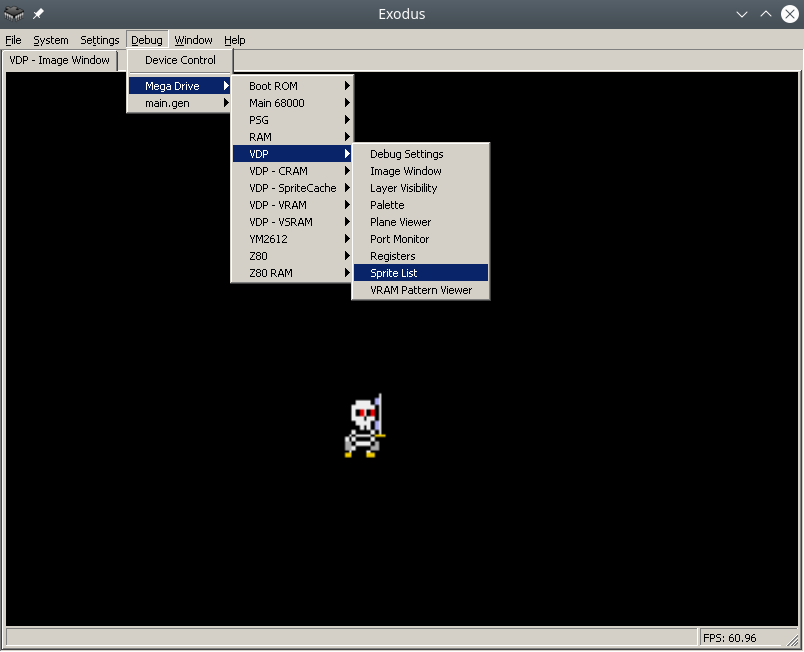
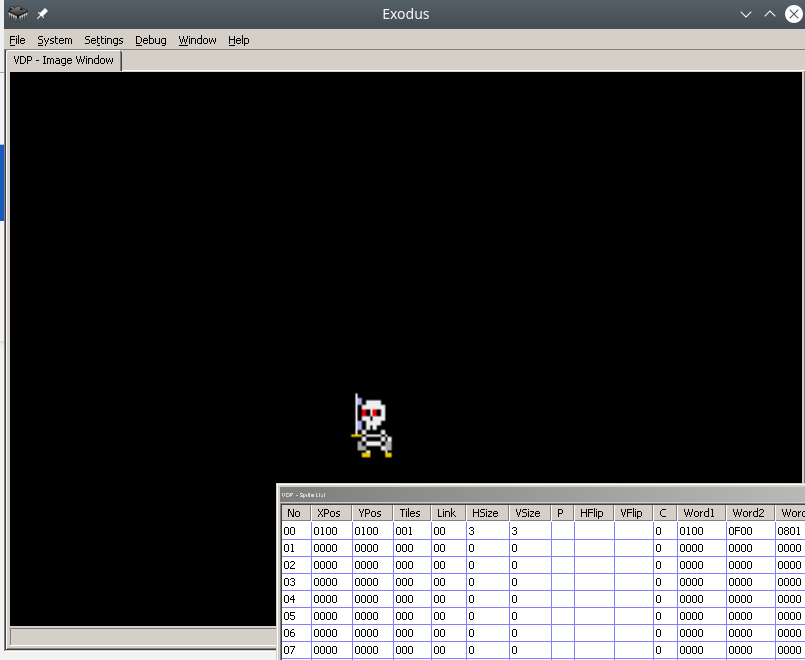
Ок, теперь запишем наш спрайт в таблицу. Для этого нужно заполнить “структуру” данных состоящую из четырех word. Бинарное описание структуры вы можете найти в мануале. Лично я сделал проще, таблицу спрайтов можно редактировать вручную в эмуляторе Exodus.
The parameters of the structure are obvious from the name, for example XPos, YPos – coordinates, Tiles – the number of the starting tile for drawing, HSize, VSize – the size of the sprite by adding parts 8×8, HFlip, VFlip – hardware rotations of the sprite horizontally and vertically.

It is very important to remember that sprites can be off-screen, this is correct behavior, since unloading off-screen sprites from memory is quite a resource-intensive task.
After filling the data in the emulator, it needs to be copied from VRAM to address 0xF000, Exodus also supports this feature.
By analogy with drawing tiles, first we access the VDP control port to start writing at address 0xF000, then we write the structure to the data port.
Let me remind you that the description of VRAM addressing can be read in the manual or in the blog Nameless Algorithm.

In short, VDP addressing works like this:
[..DC BA98 7654 3210 …. …. …. ..FE]
Where hex is the bit position in the desired address. The first two bits are the type of command requested, for example 01 – write to VRAM. Then for address 0XF000 you get:
0111 0000 0000 0000 0000 0000 0000 0011 (70000003)

As a result we get the code:

  move.l #$70000003,vdp_control_port 
  move.w #$0100,vdp_data_port 
  move.w #$0F00,vdp_data_port 
  move.w #$0001,vdp_data_port 
  move.w #$0100,vdp_data_port 

After this, the skeleton sprite will be displayed at coordinates 256, 256. Cool, huh?

Links

https://gitlab.com/demensdeum /segagenesissamples/-/tree/main/7Sprite/vasm
https://opengameart.org/content/skeleton-guy-animated

Sources

https://namelessalgorithm.com/genesis/blog/vdp/
https://www.chibiakumas.com/68000/platform3.php#LessonP27
https://plutiedev.com/sprites

Writing Assembler for Sega Genesis #3

In this note I will describe how to display an image from tiles on the Sega Genesis emulator using assembler.
The splash image Demens Deum in the Exodus emulator will look like this:

The process of outputting a PNG image using tiles is done step by step:

  1. Reduce image to fit Sega screen
  2. Convert PNG to assembly data code, with separation into colors and tiles
  3. Loading color palette into CRAM
  4. Loading tiles/patterns into VRAM
  5. Loading tile indices to Plane A/B addresses into VRAM
  6. You can reduce the image to the size of the Sega screen using your favorite graphics editor, such as Blender.

PNG conversion

To convert images, you can use the ImaGenesis tool, to work under wine, you need Visual Basic 6 libraries, they can be installed using winetricks (winetricks vb6run), or RICHTX32.OCX can be downloaded from the Internet and placed in the application folder for correct operation.

In ImaGenesis, you need to select 4-bit color, export colors and tiles to two assembler files. Then, in the file with colors, you need to put each color into a word (2 bytes), for this, the opcode dc.w is used.

For example CRAM splash screen:

  dc.w $0000 
  dc.w $0000 
  dc.w $0222 
  dc.w $000A 
  dc.w $0226 
  dc.w $000C 
  dc.w $0220 
  dc.w $08AA 
  dc.w $0446 
  dc.w $0EEE 
  dc.w $0244 
  dc.w $0668 
  dc.w $0688 
  dc.w $08AC 
  dc.w $0200 
  dc.w $0000 

Leave the tile file as is, it already contains the correct format for loading. Example of part of the tile file:

	dc.l	$11111111	; Tile #0 
	dc.l	$11111111 
	dc.l	$11111111 
	dc.l	$11111111 
	dc.l	$11111111 
	dc.l	$11111111 
	dc.l	$11111111 
	dc.l	$11111111 
	dc.l	$11111111	; Tile #1 
	dc.l	$11111111 
	dc.l	$11111111 
	dc.l	$11111111 
	dc.l	$11111111 
	dc.l	$11111111 
	dc.l	$11111111 
	dc.l	$11111111 

As you can see from the example above, the tiles are an 8×8 grid of CRAM color palette indices.

Colors in CRAM

Loading into CRAM is done by setting the color load command at a specific CRAM address in the control port (vdp control). The command format is described in the Sega Genesis Software Manual (1989), I will only add that it is enough to add 0x20000 to the address to move to the next color.

Next, you need to load the color into the data port (vdp data); The easiest way to understand the loading is with the example below:

    lea Colors,a0 ; pointer to Colors label 
    move.l #15,d7; colors counter 
VDPCRAMFillLoopStep: 
    move.l  d0,vdp_control_port ;  
    move.w  (a0)+,d1; 
    move.w  d1,(vdp_data_port); 
    add.l #$20000,d0 ; increment CRAM address 
    dbra d7,VDPCRAMFillLoopStep 

Tiles in VRAM

Next comes loading of tiles/patterns into the VRAM video memory. To do this, select an address in VRAM, for example 0x00000000. By analogy with CRAM, we address the VDP control port with a command to write to VRAM and the starting address.

After that, you can upload longwords to VRAM, compared to CRAM, you do not need to specify the address for each longword, since there is a VRAM autoincrement mode. You can enable it using the VDP register flag 0x0F (dc.b $02)

  lea Tiles,a0 
  move.l #$40200000,vdp_control_port; write to VRAM command 
  move.w #6136,d0 ; (767 tiles * 8 rows) counter 
TilesVRAMLoop: 
  move.l (a0)+,vdp_data_port; 
  dbra d0,TilesVRAMLoop 

Tile indexes in Plane A/B

Now we need to fill the screen with tiles by their index. To do this, fill the VRAM at the address Plane A/B, which is set in the VDP registers (0x02, 0x04). More details about the tricky addressing are in the Sega manual, in my example the VRAM address is 0xC000, we will unload the indices there.

Your image will fill the off-screen VRAM space anyway, so after drawing the screen space, your renderer should stop drawing and continue again when the cursor moves to a new line. There are many options for how to implement this, I used the simplest option of counting on two registers of the image width counter, the cursor position counter.

Code example:

  move.w #0,d0     ; column index 
  move.w #1,d1     ; tile index 
  move.l #$40000003,(vdp_control_port) ; initial drawing location 
  move.l #2500,d7     ; how many tiles to draw (entire screen ~2500) 

imageWidth = 31 
screenWidth = 64 

FillBackgroundStep: 
  cmp.w	#imageWidth,d0 
  ble.w	FillBackgroundStepFill 
FillBackgroundStep2: 
  cmp.w	#imageWidth,d0 
  bgt.w	FillBackgroundStepSkip 
FillBackgroundStep3: 
  add #1,d0 
  cmp.w	#screenWidth,d0 
  bge.w	FillBackgroundStepNewRow 
FillBackgroundStep4: 
  dbra d7,FillBackgroundStep    ; loop to next tile 

Stuck: 
  nop 
  jmp Stuck 

FillBackgroundStepNewRow: 
  move.w #0,d0 
  jmp FillBackgroundStep4 
FillBackgroundStepFill: 
  move.w d1,(vdp_data_port)    ; copy the pattern to VPD 
  add #1,d1 
  jmp FillBackgroundStep2 
FillBackgroundStepSkip: 
  move.w #0,(vdp_data_port)    ; copy the pattern to VPD 
  jmp FillBackgroundStep3 

After that, all that remains is to compile the ROM using vasm, run the simulator, and see the picture.

Debugging

Not everything will work out right away, so I want to recommend the following Exodus emulator tools:

  1. m68k processor debugger
  2. Changing the number of m68k processor cycles (for slow-mo mode in the debugger)
  3. Viewers CRAM, VRAM, Plane A/B
  4. Carefully read the documentation for m68k, the opcodes used (not everything is as obvious as it seems at first glance)
  5. View code/disassembly examples of games on github
  6. Implement subroutines of processor exceptions, handle them

Pointers to subroutines of processor exceptions are placed in the ROM header, also on GitHub there is a project with an interactive runtime debugger for Sega, called genesis-debugger.

Use all the tools available, have fun old school coding and may Blast Processing be with you!

Links

https://gitlab.com/demensdeum /segagenesisamples/-/tree/main/6Image/vasm
http://devster.monkeeh.com/sega/imagenesis/
https://github.com/flamewing/genesis-debugger

Sources

https://www.chibiakumas.com/68000/helloworld .php#LessonH5
https://huguesjohnson.com/programming/genesis/tiles-sprites/


Writing Assembler for Sega Genesis #2

In this note I will describe how to load colors into the Sega palette in assembler.
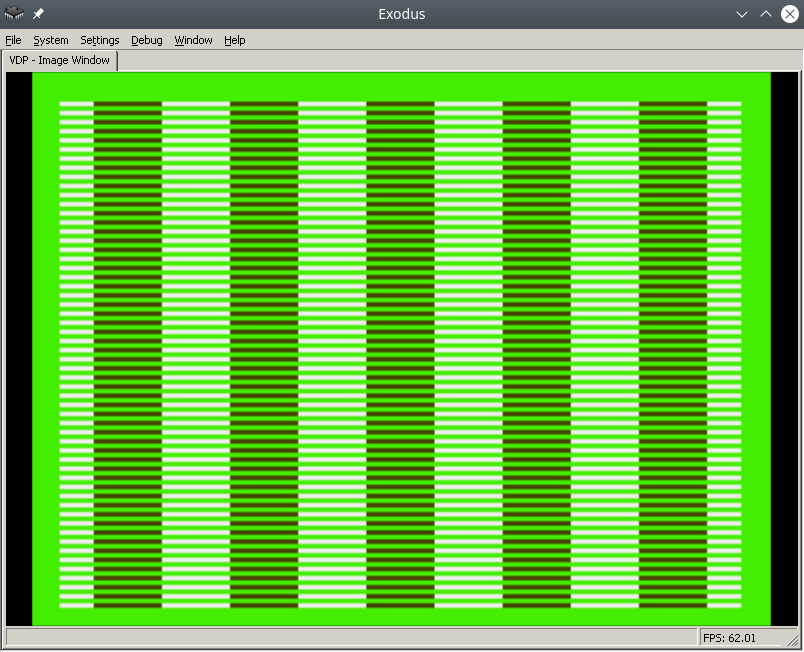
The final result in the Exodus emulator will look like this:

To make the process easier, find a pdf online called Genesis Software Manual (1989), it describes the whole process in great detail, in fact, this note is a commentary on the original manual.

In order to write colors to the VDP chip of the Sega emulator, you need to do the following:

  • Disable TMSS protection system
  • Write the correct parameters to the VDP registers
  • Write the desired colors to CRAM

For assembly we will use vasmm68k_mot and a favorite text editor, for example echo. Assembly is carried out by the command:

Порты VDP

VDP чип общается с M68K через два порта в оперативной памяти – порт контроля и порт данных.
По сути:

  1. Через порт контроля можно выставлять значения регистрам VDP.
  2. Также порт контроля является указателем на ту часть VDP (VRAM, CRAM, VSRAM etc.) через которую передаются данные через порт данных

Интересная информация: Сега сохранила совместимость с играми Master System, на что указывает MODE 4 из мануала разработчика, в нем VDP переключается в режим Master System.

Объявим порты контроля и данных:

vdp_data_port        = $C00000

Отключить систему защиты TMSS

Защита от нелицензионных игр TMSS имеет несколько вариантов разблокировки, например требуется чтобы до обращения к VDP в адресном регистре A1 лежала строка “SEGA”.

MOVE.B A1,D0; Получаем версию хардвары цифрой из A1 в регистр D0 
ANDI.B 0x0F,D0; По маске берем последние биты, чтобы ничего не сломать 
BEQ.B SkipTmss; Если версия равна 0, скорее всего это японка или эмулятор без включенного TMSS, тогда идем в сабрутину SkipTmss 
MOVE.L "SEGA",A1; Или записываем строку SEGA в A1 

Write the correct parameters to the VDP registers

Why set the correct parameters in the VDP registers at all? The idea is that the VDP can do a lot, so before drawing you need to initialize it with the necessary features, otherwise it simply won't understand what you want from it.

Each register is responsible for a specific setting/operating mode. The Sega manual specifies all the bits/flags for each of the 24 registers, and a description of the registers themselves.

Let's take ready-made parameters with comments from the bigevilcorporation blog:


VDPReg0:   dc.b $14 ;  0: H interrupt on, palettes on 
VDPReg1:   dc.b $74 ;  1: V interrupt on, display on, DMA on, Genesis mode on 
VDPReg2:   dc.b $30 ;  2: Pattern table for Scroll Plane A at VRAM $C000 
                    ;     (bits 3-5 = bits 13-15) 
VDPReg3:   dc.b $00 ;  3: Pattern table for Window Plane at VRAM $0000 
                    ;     (disabled) (bits 1-5 = bits 11-15) 
VDPReg4:   dc.b $07 ;  4: Pattern table for Scroll Plane B at VRAM $E000 
                    ;     (bits 0-2 = bits 11-15) 
VDPReg5:   dc.b $78 ;  5: Sprite table at VRAM $F000 (bits 0-6 = bits 9-15) 
VDPReg6:   dc.b $00 ;  6: Unused 
VDPReg7:   dc.b $00 ;  7: Background colour - bits 0-3 = colour, 
                    ;     bits 4-5 = palette 
VDPReg8:   dc.b $00 ;  8: Unused 
VDPReg9:   dc.b $00 ;  9: Unused 
VDPRegA:   dc.b $FF ; 10: Frequency of Horiz. interrupt in Rasters 
                    ;     (number of lines travelled by the beam) 
VDPRegB:   dc.b $00 ; 11: External interrupts off, V scroll fullscreen, 
                    ;     H scroll fullscreen 
VDPRegC:   dc.b $81 ; 12: Shadows and highlights off, interlace off, 
                    ;     H40 mode (320 x 224 screen res) 
VDPRegD:   dc.b $3F ; 13: Horiz. scroll table at VRAM $FC00 (bits 0-5) 
VDPRegE:   dc.b $00 ; 14: Unused 
VDPRegF:   dc.b $02 ; 15: Autoincrement 2 bytes 
VDPReg10:  dc.b $01 ; 16: Vert. scroll 32, Horiz. scroll 64 
VDPReg11:  dc.b $00 ; 17: Window Plane X pos 0 left 
                    ;     (pos in bits 0-4, left/right in bit 7) 
VDPReg12:  dc.b $00 ; 18: Window Plane Y pos 0 up 
                    ;     (pos in bits 0-4, up/down in bit 7) 
VDPReg13:  dc.b $FF ; 19: DMA length lo byte 
VDPReg14:  dc.b $FF ; 20: DMA length hi byte 
VDPReg15:  dc.b $00 ; 21: DMA source address lo byte 
VDPReg16:  dc.b $00 ; 22: DMA source address mid byte 
VDPReg17:  dc.b $80 ; 23: DMA source address hi byte, 
                    ;     memory-to-VRAM mode (bits 6-7)  

Okay, now let's go to the control port and write all the flags to the VDP registers:

    move.l  #VDPRegisters,a0 ; Пишем адрес таблицы параметров в A1 
    move.l  #$18,d0          ; Счетчик цикла - 24 = 18 (HEX) в D0 
    move.l  #$00008000,d1    ; Готовим команду на запись в регистр VDP по индексу 0, по мануалу - 1000 0000 0000 0000 (BIN) = 8000 (HEX) 

FillInitialStateForVDPRegistersLoop: 
    move.b  (a0)+,d1         ; Записываем в D1 итоговое значение регистра VDP из таблицы параметров, на отправку в порт контроля VDP  
    move.w  d1,vdp_control_port     ; Отправляем итоговую команду + значение из D1 в порт контроля VDP 
    add.w   #$0100,d1        ; Поднимаем индекс регистра VDP на 1 (бинарное сложение +1 к индексу по мануалу Сеги) 
    dbra    d0,FillInitialStateForVDPRegistersLoop ; Уменьшаем счетчик регистров, продолжаем цикл если необходимо

Самое сложное это прочитать мануал и понять в каком формате подаются данные на порт контроля, опытные разработчики разберутся сразу, а вот неопытные… Немного подумают и поймут, что синтаксис для записи регистров такой:

0B100(5 бит – индекс регистра)(8 бит/байт – значение)

0B1000001001000101 – записать в регистр VDP 2 (00010), значение флажков 01000101.

Записать нужные цвета в CRAM

Далее идем писать два цвета в память цветов CRAM (Color RAM). Для этого пишем в порт контроля команду на доступ к цвету по индексу 0 в CRAM и отправляем по дата порту цвет. Все!

Пример:

    move.l  #$C0000000,vdp_control_port ; Доступ к цвету по индексу 0 в CRAM через порт контроля  
    move.w  #228,d0; Цвет в D0 
    move.w  d0,vdp_data_port; Отправляем цвет в порт данных 

After building and running in the emulator in Exodus, you should have a screen filled with color 228.

Let's fill it with a second color, at the last byte 127.

  move.l  #$C07f0000,vdp_control_port ; Доступ к цвету по байту 127 в CRAM через порт контроля 
  move.w  #69,d0; Цвет в D0 
  move.w  d0,vdp_data_port; Отправляем цвет в порт данных 

Links

https://gitlab.com/demensdeum/segagenesissamples
https://www.exodusemulator.com/
http://sun.hasenbraten.de/vasm/
https://tomeko.net/online_tools/bin_to_32bit_hex.php?lang=en

Sources

https://namelessalgorithm.com/genesis/blog/genesis/
https://plutiedev.com/vdp-commands
https://huguesjohnson.com/programming/genesis/palettes/
https://www.chibiakumas.com/68000/helloworld.php#LessonH5
https://blog.bigevilcorporation.co.uk/2012/03/09/sega-megadrive-3-awaking-the-beast/

Writing Assembler for Sega Genesis #1

The first article dedicated to writing games for the classic Sega Genesis console in Motorola 68000 Assembler.

Let’s write the simplest infinite loop for Sega. For this we will need: assembler, emulator with disassembler, favorite text editor, basic understanding of Sega ROM structure.

For development, I use my own assembler/Dizassembler GEN68KRYBABY:

https://gitlab.com/demensdeum/gen68krybaby/

The tool is developed in Python 3, for assembly a file with the extension .asm or .gen68KryBabyDisasm is fed to the input, the output is a file with the extension .gen68KryBabyAsm.bin, which can be run in an emulator or on a real console (be careful, move away, the console may explode!)

ROM disassembly is also supported, for this you need to supply a ROM file to the input, without the .asm or .gen68KryBabyDisasm extensions. Opcode support will increase or decrease depending on my interest in the topic, the participation of contributors.

Structure

The Sega ROM header takes up the first 512 bytes. It contains information about the game, the title, supported peripherals, checksum, and other system flags. I assume that without the header, the console won’t even look at the ROM, thinking that it’s invalid, like “what are you giving me here?”

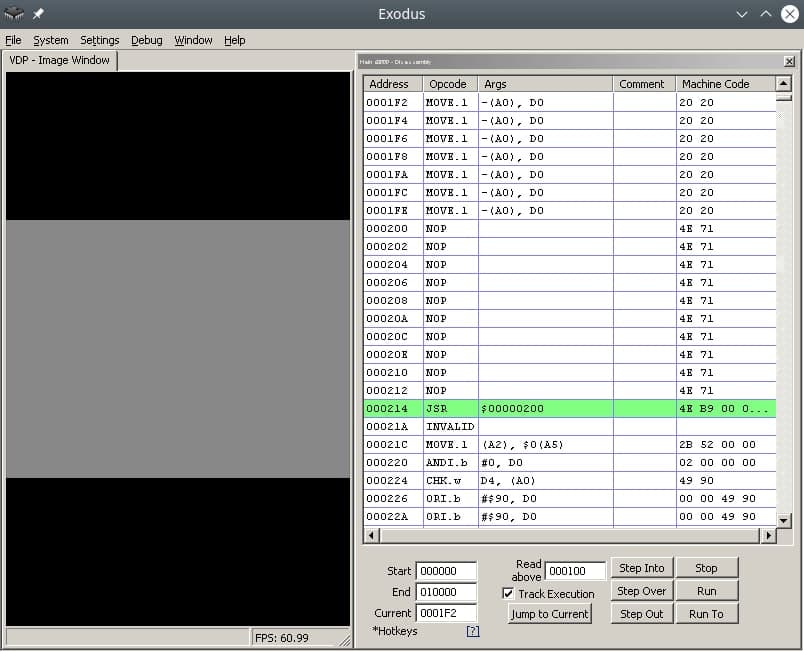
After the header comes the Reset subroutine/subprogram, with it the m68K processor starts working. Okay, now it’s a small matter – find the opcodes (operation codes), namely, doing nothing(!) and jumping to the subroutine at the address in memory. Googling, you can find the NOP opcode, which does nothing, and the JSR opcode, which performs an unconditional jump to the argument address, that is, it simply moves the carriage where we ask it to, without any whims.

Putting it all together

The title donor for the ROM was one of the games in the Beta version, currently written as hex data.


 00 ff 2b 52 00 00 02 00 00 00 49 90 00 00 49 90 00 00 49 90 00...и т.д. 

Код программы со-но представляет из себя объявление сабрутины Reset/EntryPoint в 512 (0x200) байте, NOP, возврат каретки к 0x00000200, таким образом мы получим бесконечный цикл.

Ассемблерный код сабрутины Reset/EntryPoint:

    NOP
    NOP
    NOP 
    NOP
    NOP
    JSR 0x00000200  

Full example with rom title:

https://gitlab.com /demensdeum/segagenesisamples/-/blob/main/1InfiniteLoop/1infiniteloop.asm

Next we collect:

Запускаем ром 1infiniteloop.asm.gen68KryBabyAsm.bin в режиме дебаггера эмулятора Exodus/Gens, смотрим что m68K корректно считывает NOP, и бесконечно прыгает к EntryPoint в 0x200 на JSR

Здесь должен быть Соник показывающий V, но он уехал на Вакен.

Ссылки

https://gitlab.com/demensdeum/gen68krybaby/

https://gitlab.com/demensdeum/segagenesissamples

https://www.exodusemulator.com/downloads/release-archive

Источники

ROM Hacking Demo – Genesis and SNES games in 480i

http://68k.hax.com/

https://www.chibiakumas.com/68000/genesis.php

https://plutiedev.com/rom-header

https://blog.bigevilcorporation.co.uk/2012/02/28/sega-megadrive-1-getting-started/

https://opensource.apple.com/source/cctools/cctools-836/as/m68k-opcode.h.auto.html

Flame Steel Engine Runner

I present to your attention Flame Steel Engine Runner – a platform for launching multimedia applications based on the Flame Steel Engine toolkit. The supported platforms are Windows, MacOS, Linux, Android, iOS, HTML 5. The emphasis of application code development has shifted towards scripting – at the moment, JavaScript support has been added using TinyJS, the toolkit and engine itself will continue to be developed in languages ​​close to hardware (C, C++, Rust, etc.)
Flame Steel Engine Runner Demo
On the page below you can spin the cube, write JavaScript code, upload models, sounds, music, code using the Upload files button, and start from the main.js file using the Run button.
https://demensdeum.com/demos/FlameSteelEngineRunner/

KleyMoment – utility for gluing script files

I present to your attention a utility for gluing script files – KleyMoment, as well as a reverse utility for ungluing files back. The utility can be used to glue JavaScript files into one.
The tool is implemented in Python 3 and has a simple command line interface of the form:

python3 KleyMoment.py extensionFiles directoryContainingFiles outputFile

For example, recursive merging of js files from the scripts directory into the output.js file

python3 KleyMoment.py js scripts output.js

Also a utility for unsticking files back AntiKleyMoment, it takes a glued file as input, for example:

python3 AntiKleyMoment.py output.js

Repository:
https://gitlab.com/demensdeum/kleymoment/

Space Jaguar Action RPG 0.0.4

First prototype of Space Jaguar Action RPG for Webassembly:

It will take a long time to load (53 MB) without loading indication.

Space Jaguar Action RPG – a space pirate life simulator. At the moment, the simplest game mechanics are available:

  • fly in space
  • to die
  • eat
  • sleep
  • hire a team
  • look at the restless, fast-flying flow of time

Due to poor optimization of 3D scene rendering in the web version, it is not possible to walk in a 3D environment. Optimization will be added in future versions.

The source code of the engine, game, scripts is available under the MIT license. All suggestions for improvement are accepted extremely positively:

https://gitlab.com/demensdeum/space-jaguar -action-rpg

Screenshots from the native Linux version:

How I didn’t hit the guy on the pole or a story about amazing ingenuity

In this note I will write about the importance of architectural decisions in the development, support of the application, in the conditions of team development.

Professor Lucifer Gorgonzola’s Self-Operating Napkin. Rube Goldberg

In my youth, I worked on an app for ordering a taxi. In the program, you could choose a pickup point, a drop point, calculate the cost of the trip, the type of tariff, and, in fact, order a taxi. I got the application at the last stage of pre-launch, after adding several fixes, the application was released in the AppStore. Already at that stage, the whole team understood that it was implemented very poorly, design patterns were not used, all components of the system were tightly connected, in general, it could have been written into one large solid class (God object), nothing would have changed, since the classes mixed their boundaries of responsibility and, in general, overlapped each other with a dead link. Later, the management decided to write the application from scratch, using the correct architecture, which was done and the final product was implemented to several dozen B2B clients.

However, I will describe a funny incident from the previous architecture, from which I sometimes wake up in a cold sweat in the middle of the night, or suddenly remember in the middle of the day and start laughing hysterically. The thing is that I couldn’t hit the guy on the pole the first time, and this brought down most of the application, but first things first.

It was a normal working day, one of the customers gave me a task to slightly improve the design of the application – just move the icon in the center of the pickup address selection screen up a few pixels. Well, having professionally estimated the task at 10 minutes, I moved the icon up 20 pixels, completely unsuspecting, I decided to check the taxi order.

What? The app doesn’t show the order button anymore? How did that happen?

I couldn’t believe my eyes, after raising the icon by 20 pixels the app stopped showing the continue order button. After reverting the change I saw the button again. Something was wrong here. After sitting in the debugger for 20 minutes I got a little tired of unwinding the spaghetti of overlapping class calls, but I found that *moving the image really changes the logic of the app*

The whole thing was in the icon in the center – a man on a pole, when the map was moved, he jumped up to animate the camera movement, this animation was followed by the disappearance of the button at the bottom. Apparently, the program thought that the man, moved by 20 pixels, was jumping, so according to internal logic, it hid the confirmation button.

How can this happen? Does the *state* of the screen depend not on the pattern of the state machine, but on the *representation* of the position of the man on the pole?

That’s exactly what happened, every time the map was drawn, the application *visually poked* the middle of the screen and checked what was there, if there was a guy on a pole, it meant that the map shift animation had ended and the button needed to be shown. If there was no guy there, it meant that the map was shifting and the button needed to be hidden.

Everything is great in the example above, firstly it is an example of a Goldberg Machine (smart machines), secondly it is an example of a developer’s unwillingness to somehow interact with other developers in the team (try to figure it out without me), thirdly you can list all the problems with SOLID, patterns (code smells), violation of MVC and much, much more.

Try not to do this, develop in all possible directions, help your colleagues in their work. Happy New Year to all)

Links

https://ru.wikipedia.org/wiki/Goldberg_Machine

https://ru.wikipedia.org/wiki/SOLID

https://refactoring.guru/ru/refactoring/smells

https://ru.wikipedia.org/wiki/Model -View-Controller

https://refactoring.guru/ru/design-patterns/state

Guess the group

In this note I will describe working with the fasttext text classifier.

Fasttext is a machine learning library for text classification. Let’s try to teach it to identify a metal band by the title of a song. To do this, we will use supervised learning using a dataset.

Let’s create a dataset of songs with band names:

__label__metallica fuel
__label__metallica escape
__label__black_sabbath gypsy
__label__black_sabbath snowblind
__label__black_sabbath am i going insane
__label__anthrax anthrax
__label__anthrax i'm alive
__label__anthrax antisocial
[и т.д.]

Формат обучающей выборки:

Обучим fasttext и сохраним модель:

model.save_model("model.bin")

Let's load the trained model and ask it to identify the band by the song title:

predictResult = model.predict("Bleed")
print(predictResult)

В результате мы получим список классов на которые похож данный пример, с указанием уровня похожести цифрой, в нашем случае похожесть названия песни Bleed на одну из групп датасета.
Для того чтобы модель fasttext умела работать с датасетом выходящим за границы обучающей выборки, используют режим autotune с использованием файла валидации (файл тест). Во время автотюна fasttext подбирает оптимальные гиперпараметры модели, проводя валидацию результата на выборке из тест файла. Время автотюна ограничивается пользователем в самостоятельно, с помощью передачи аргумента autotuneDuration.
Пример создания модели с использованием файла тест:

x86_64 Assembler + C = One Love

In this note I will describe the process of calling C functions from assembler.
Let’s try calling printf(“Hello World!\n”); and exit(0);

    message: db "Hello, world!", 10, 0

section .text
    extern printf
    extern exit
    global main

main:
    xor	rax, rax
    mov	rdi, message    
    call printf
    xor rdi, rdi
    call exit

Everything is much simpler than it seems, in the .rodata section we will describe static data, in this case the string “Hello, world!”, 10 is the newline character, also do not forget to zero it.

In the code section, we will declare external functions printf, exit of the stdio, stdlib libraries, and also declare the entry function main:

    extern printf
    extern exit
    global main

We pass 0 to the return register from the rax function, you can use mov rax, 0; but to speed it up, use xor rax, rax; Next, we pass a pointer to a string to the first argument:

Далее вызываем внешнюю функцию Си printf:

    xor	rax, rax
    mov	rdi, message    
    call printf
    xor rdi, rdi
    call exit

By analogy, we pass 0 to the first argument and call exit:

    call exit

As Americans say:
Who doesn't listen to anyone
That pilaf is eaten by @ Alexander Pelevin

Sources

https://www.devdungeon. com/content/how-mix-c-and-assembly
https://nekosecurity.com/x86-64-assembly/part-3-nasm-anatomy-syscall-passing-argument
https://www.cs.uaf.edu/2017/fall/cs301/reference/x86_64.html

Source code

https://gitlab.com/demensdeum/assembly-playground

Hello World x86_64 assembler

In this note I will describe the process of setting up the IDE, writing the first Hello World in x86_64 assembler for the Ubuntu Linux operating system.
Let’s start with installing the SASM IDE, nasm assembler:

Далее запустим SASM и напишем Hello World:


section .text

main:
    mov rbp, rsp      ; for correct debugging
    mov rax, 1        ; write(
    mov rdi, 1        ;   STDOUT_FILENO,
    mov rsi, msg      ;   "Hello, world!\n",
    mov rdx, msglen   ;   sizeof("Hello, world!\n")
    syscall           ; );

    mov rax, 60       ; exit(
    mov rdi, 0        ;   EXIT_SUCCESS
    syscall           ; );

section .rodata
    msg: db "Hello, world!"
    msglen: equ $-msg

The Hello World code is taken from James Fisher's blog, adapted for assembly and debugging in SASM. The SASM documentation states that the entry point must be a function named main, otherwise debugging and compilation of the code will be incorrect.
What did we do in this code? We made a syscall call - an appeal to the Linux operating system kernel with the correct arguments in the registers, a pointer to a string in the data section.

Under the magnifying glass

Let's look at the code in more detail:

global – директива ассемблера позволяющая задавать глобальные символы со строковыми именами. Хорошая аналогия – интерфейсы заголовочных файлов языков C/C++. В данном случае мы задаем символ main для функции входа.

section – директива ассемблера позволяющая задавать секции (сегменты) кода. Директивы section или segment равнозначны. В секции .text помещается код программы.

Обьявляем начало функции main. В ассемблере функции называются подпрограммами (subroutine)

Первая машинная команда mov – помещает значение из аргумента 1 в аргумент 2. В данном случае мы переносим значение регистра rbp в rsp. Из комментария можно понять что эту строку добавил SASM для упрощения отладки. Видимо это личные дела между SASM и дебаггером gdb.

Далее посмотрим на код до сегмента данных .rodata, два вызова syscall, первый выводит строку Hello World, второй обеспечивает выход из приложения с корректным кодом 0.

Представим себе что регистры это переменные с именами rax, rdi, rsi, rdx, r10, r8, r9. По аналогии с высокоуровневыми языками, перевернем вертикальное представление ассемблера в горизонтальное, тогда вызов syscall будет выглядеть так:

Тогда вызов печати текста:

Вызов exit с корректным кодом 0:

Рассмотрим аргументы подробнее, в заголовочном файле asm/unistd_64.h находим номер функции __NR_write – 1, далее в документации смотрим аргументы для write:
ssize_t write(int fd, const void *buf, size_t count);

Первый аргумент – файловый дескриптор, второй – буфер с данными, третий – счетчик байт для записи в дескриптор. Ищем номер файлового дескриптора для стандартного вывода, в мануале по stdout находим код 1. Далее дело за малым, передать указатель на буфер строки Hello World из секции данных .rodata – msg, счетчик байт – msglen, передать в регистры rax, rdi, rsi, rdx корректные аргументы и вызвать syscall.

Обозначение константных строк и длины описывается в мануале nasm:

Characteristics in Space Jaguar Action RPG

The first article about the game in development Space Jaguar Action RPG. In this article I will describe the gameplay feature of the Jaguar – Characteristics.

Many RPGs use a static system of character stats, such as those from DnD (Strength, Constitution, Dexterity, Intelligence, Wisdom, Charisma), or Fallout’s S.P.E.C.I.A.L (Strength, Perception, Endurance, Charisma, Intelligence, Dexterity, Luck).

In Space Jaguar, I plan to implement a dynamic system of characteristics, for example, the main character of the game, Jag, at the start has only three characteristics – Blade mastery (half-sabre), shadow operations (making deals in the criminal world), rogue abilities (picking locks, stealing). During the game, characters will be given and deprived of dynamic characteristics within the game module, all checks will be made based on the level of certain characteristics necessary for a given game situation. For example, Jag will not be able to win a game of chess if he does not have the chess game characteristic, or does not have a sufficient level to pass the check.

To simplify the logic of checks, each characteristic is given a 6-digit code in English letters, a name, a description. For example, for blade ownership:

bladeFightingAbility.name = "BLADFG"; 
bladeFightingAbility.description = "Blade fighting ability"; 
bladeFightingAbility.points = 3;

Перед стартом игрового модуля можно будет просмотреть список публичных проверок необходимых для прохождения, также создатель может скрыть часть проверок для создания интересных игровых ситуаций.

Ноу-хау? Будет ли интересно? Лично я нахожу такую систему интересной, позволяющей одновременно обеспечить свободу творчества создателям игровых модулей, и возможность переноса персонажей из разных, но похожих по характеристикам, модулей для игроков.